


WhatsApp Username for Android and IOS
WhatsApp is one of the most widely used messaging apps in the world and Meta continues to introduce new features that improve user experience. One of the latest additions is the WhatsApp Username feature.
Instead of sharing your phone number with everyone now you will be able to connect using a unique username, just like Instagram. This makes chatting with new people more private and convenient especially when you are interacting in communities, businesses, or public groups.
If you have heard about WhatsApp usernames but aren’t sure how they work, how to create one or why the option is not available on your phone yet, you are at the right place.
In this article, we will explain everything you need to know about WhatsApp usernames, including how to set one up, the eligibility rules, feature rollout status, and some useful username ideas.
What Is a WhatsApp Username?
A WhatsApp username is a unique identifier that lets other people find and contact you without knowing your phone number.
Traditionally, WhatsApp accounts have always been linked to mobile numbers. While your phone number will still be required to create and verify your account. The username feature gives you another way to connect with others.
For example, instead of sharing your personal number, you could simply tell someone your username such as:
- @rahul23
- @jessica.work
- @alex_travels
The other person can search for your username and start a conversation without seeing your phone number, depending on your privacy settings and how Meta implements the feature during the rollout.
Who Can Use WhatsApp Username?
At the time of writing, WhatsApp usernames are not available to everyone. Meta is gradually rolling out the feature to selected users through beta testing before making it available worldwide.
If you don’t see the option yet, don’t worry. It doesn’t necessarily mean there’s a problem with your account. New WhatsApp features are often released in phases, so availability may vary depending on factors such as your app version, whether you are using the beta version and the country or region.
As the rollout expands, more users on both Android and IOS are expected to receive the feature.
How to Create a WhatsApp Username
If the Username feature has been enabled for your account, creating the username takes only a few minutes. Before you start, make sure you are using the latest version of WhatsApp.
WhatsApp Username on Android
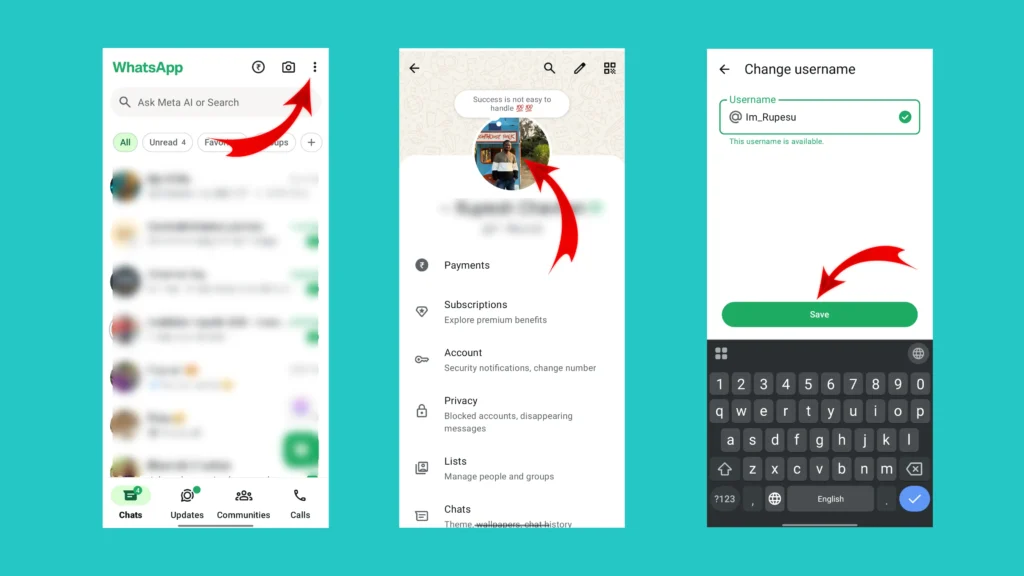
Follow these steps to create your WhatsApp username:
- Open WhatsApp on your Android phone.
- Tap the three-dot menu in the top-right corner.
- Select Settings.
- Tap your profile picture at the top.
- Look for the Username option.
- Enter your preferred username. If the username is available, WhatsApp will confirm it.
- Tap Save to create and reserve your username.
WhatsApp Username on IOS
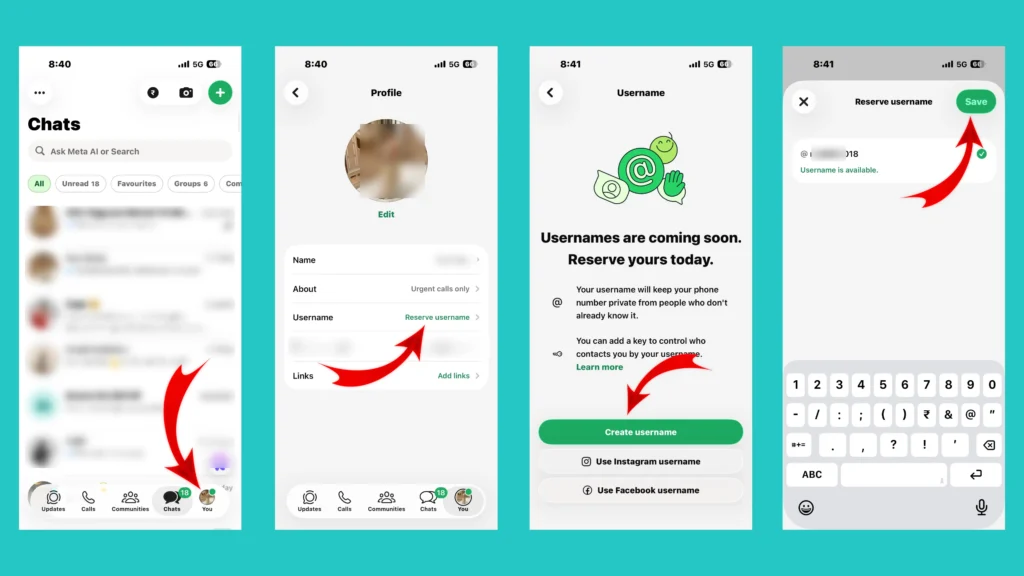
If you are using WhatsApp on an iPhone, follow the steps mentioned below.
- Open WhatsApp.
- Tap the Settings tab at the bottom.
- Select your profile.
- Tap Username.
- Type your preferred username. Wait for WhatsApp to check its availability.
- Then save your username.
Related Article: How to Post Multiple Photos on Instagram (2026 Guide)
Unable to Find the Username Option?
Don’t panic if you don’t see the Username option yet. This does not mean that something is wrong with your account.
The feature is being released gradually, so some users may receive it before others.
Try these basic checks:
- Update WhatsApp from the Play Store or App Store.
- Restart your phone.
- Check whether you’re using the latest version.
- Wait for the feature to reach your account if it is still rolling out.
How to Change Your WhatsApp Username
One of the advantages of usernames is that they are not permanent. If you decide to use a different username, you can easily change it later.
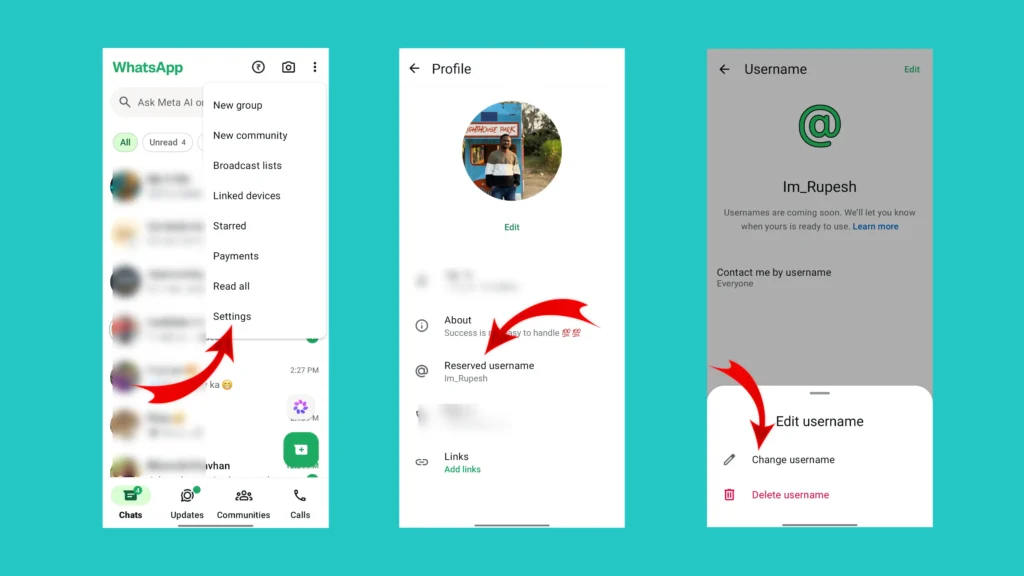
To edit your username follow the steps shown below.
- Open WhatsApp.
- Click on the three dots available in the top-right corner and select settings option.
- Tap your profile picture.
- Tap on the reserved username section.
- Tap on the “Edit” option available at the top right corner and select the change username option. You can also delete your username from here.
- Enter your new username.
- Hit the save button to save your new username.
Keep in mind that your new username must also be unique. If someone else is already using it, you will need to choose another one. The steps to change the username are the same on both Android and IOS.
How to Delete Your WhatsApp Username
If you no longer want to use a username, you have the option to delete the username. The process of deleting a WhatsApp username is more simple than creating one.
- Open WhatsApp and go to the settings by clicking on the three dot option available at the top right corner.
- Go to your Profile and tap on the “Reserved Username” option.
- Tap on the “Edit” option available at the top right corner of your phone.
- Select “Delete Username” option. A confirmation window will pop up.
- Tap on “Delete” and done. Your username is deleted now.
Once your username is deleted, other users may no longer be able to find you using that username.
Tips for Choosing a Good WhatsApp Username
A good username makes your account easier to recognize and share. Here are a few tips to create a good WhatsApp username for your account.
- Keep it short as short usernames are easier to remember and type.
- Avoid random numbers in your username as they can make a username harder to remember.
- If you use WhatsApp for work or content creation, use your name or brand name as your username
WhatsApp Username Feature Rollout
Since the Username feature is still relatively new and many users are wondering when they will be able to use it. Meta is following its usual phased rollout strategy. Instead of releasing the feature globally on the same day, it is being introduced in stages. As a result, it is completely normal if someone else already has the feature while you don’t.
Android users are generally among the first to receive experimental WhatsApp features through the beta program. If you are enrolled in WhatsApp Beta, there is a high chance you will see the username option before users on the stable version.
Just like Android, the rollout is happening gradually. Some iPhone users may receive the update earlier than others, even if they are using the same iOS version.
If you don’t see the option yet, it is best to keep WhatsApp updated and wait for the rollout to continue.
Best Username for WhatsApp
Choosing the right username is important because it is how people will recognize you on WhatsApp. A good username should be simple, memorable and easy to type.
Below are some ideas based on different styles and purposes. Feel free to customize them using your name, profession, or interests.
Simple WhatsApp Username Ideas
If you prefer a clean and minimal look, these usernames are a good for you:
- @yourname (e.g. @rajesh, @piyush, @priya)
- @yournickname (e.g. @bunty, @rocky, @cooldude)
- @firstname.lastname (e.g. @rahul.dev, @rupesh.chavhan, @payal.patle)
- @name_hobbie (e.g. @neha_design, @aditya_tech, @riya_sketch)
Professional WhatsApp Usernames
- @medzix
- @rc_creations
- @techsupport
- @legaladvisor
- @digitalcoach
- @marketingpro
- @designstudio
Stylish WhatsApp Username Ideas
- @itsrahul
- @theananya
- @heypriya
- @iamaditya
- @itsneha
- @realvishal
- @helloaarav
Business WhatsApp Username Ideas
- @smartgadgets
- @travelplanner
- @citycafe
- @fashionhub
- @bookworld
- @greenmarket
Gaming Username Ideas
- @shadowgamer
- @battleking
- @proplayer
- @headshot
- @gaminglegend
- @playarena
- @levelup
- @sniperx
Conclusion
The introduction of WhatsApp usernames is a significant step toward improving user privacy and making it easier to connect with others without sharing a personal phone number. Although the feature is still rolling out, it is expected to become available to more users over time. Once you have access, choose a username that’s simple, memorable, and reflects your personal or professional identity.
Keeping WhatsApp updated and following the latest feature releases will help you make the most of new tools as they become available.
Frequently Asked Questions (FAQs)
1. What is a WhatsApp username?
A WhatsApp username is a unique identifier that allows other users to find and contact you without needing your phone number. It provides an additional layer of privacy while making it easier to connect with people.
2. Is the WhatsApp Username feature available for everyone?
No. At the time of writing, WhatsApp is rolling out the Username feature gradually. Some users may receive it earlier than others, depending on their app version, region, and Meta’s server-side rollout.
3. Can two people have the same WhatsApp username?
No. Every WhatsApp username must be unique. If your preferred username is already taken, you’ll need to choose a different one.
4. Can I change my WhatsApp username later?
Yes. WhatsApp is expected to allow users to change their username. However, your new username must also be unique and available.
5. Can I use special characters in my WhatsApp username?
WhatsApp is expected to allow only certain characters, such as letters, numbers, underscores, and periods. Unsupported characters or emojis may not be accepted.
6. Is WhatsApp Username available on Android and iPhone?
Yes. Meta is rolling out the feature for both Android and iPhone users. Availability depends on your account and the rollout stage.
7. How can I check if the Username feature is available for me?
Open WhatsApp Settings and tap your profile. If the Username option appears, you can create one. If it isn’t there yet, keep your app updated and check again later.
[…] Related Article: WhatsApp Username – How to Create on Android and IOS […]