

How to Delete a Telegram Account Permanently
Deleting a Telegram account is a big decision. Whether you are switching to another messaging app, taking a break from social media or simply no longer need your account, it is important to understand what happens before you permanently delete it.
Unlike uninstalling the Telegram app, deleting your account removes your profile, messages, contacts, groups and other account data from Telegram’s servers. Once the deletion is complete, it cannot be undone.
In this guide, you will get to know how you can permanently delete a Telegram account using the official deactivation page and the Telegram app. We will also explain what happens after deletion, how Telegram’s automatic account deletion works and answer some common questions to help you make a good decision.
Delete Telegram Account vs Uninstall Telegram
Many users think uninstalling Telegram and deleting their account are the same thing but they are completely different.
| Uninstall Telegram | Delete Telegram Account |
|---|---|
| Removes the app from your phone. | Permanently removes your Telegram account. |
| Your chats remain on Telegram’s servers. | Your account and associated data are deleted. |
| You can reinstall and log in anytime. | You’ll need to create a new account if you want to use Telegram again. |
| No account data is erased. | Most account-related data is permanently removed. |
If you only want to stop using Telegram for a while, uninstalling the app is enough. If you want to permanently leave Telegram, you will need to delete your account.
What Happens When You Delete Your Telegram Account?
Before deleting your account, it is important to understand the consequences. Telegram treats account deletion as a permanent action, so some data cannot be recovered later.
After your account is deleted:
- Your Telegram profile is removed.
- Your contacts can no longer find your account.
- Your private chats are deleted from your account.
- Messages in cloud chats associated with your account are removed from your side.
- Your saved messages are deleted.
- Your custom settings are reset.
- You will need to register a new account if you decide to use Telegram again.
How to Delete Telegram Account
There are two mentors to delete Telegram account. Which are as follow:
Method 1: Delete Your Telegram Account Using the Official Deactivation Page
The fastest and most reliable way to permanently delete your Telegram account is by using Telegram’s official Account Deactivation Page. This method works on any device, including Android phones, iPhones, Windows PCs, Macs, and tablets, since it only requires a web browser. Follow the steps mentioned below to delete a Telegram account.
- Visit Telegram’s official account deactivation page using your preferred web browser.
💡Tip: Telegram deactivation page link – https://my.telegram.org/auth?to=delete
- Enter your phone number in the international format, including your country code. (For example: India: +91XXXXXXXXXX). Double-check the number before proceeding, as Telegram will send a confirmation code to your account.
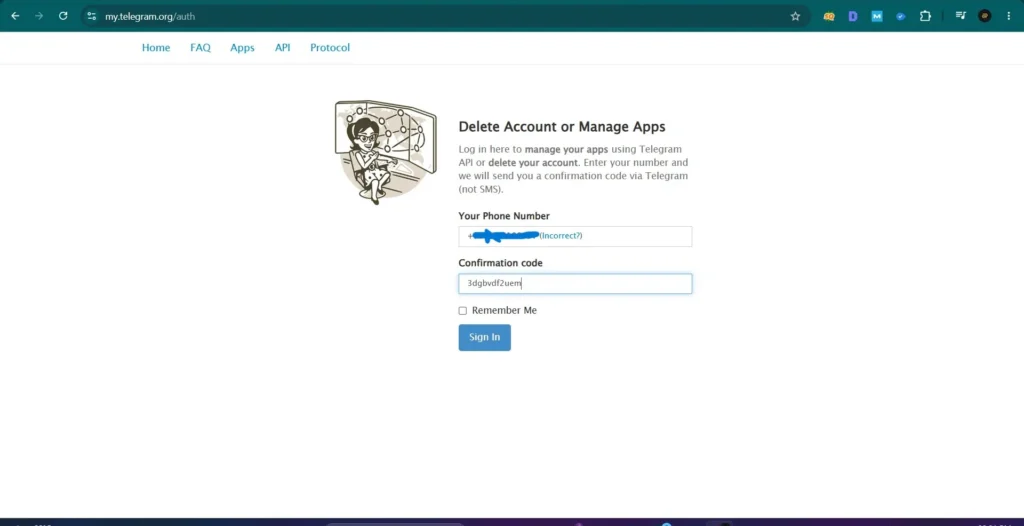
- Telegram will send a confirmation code inside the Telegram app, not as an SMS in most cases. Open Telegram on your phone and enter that code on the deactivation page.
- Once you have entered the verification code, click on the sign in button. You will be signed in to the Telegram account management page.
- Here, you will find three options.
- API development tools
- Delete account
- Log out
- Select delete account option.
- Telegram will ask the reason for deleting the telegram account. Providing a reason is completely optional. You can enter a short reason or leave the field blank. Then click the “Delete My Account” button available at the bottom of the screen.
- A final confirmation message will pop up asking whether you are sure you want to delete your Telegram account. Read the warning carefully and click the “Yes, Delete My Account” button.
Once confirmed, your Telegram account will be permanently deleted.
Method 2: Delete Your Telegram Account from the Telegram App
Although Telegram doesn’t provide a direct “Delete Account” button in the app, it does make it easy to reach the official account deletion page through its Help section.
This method is useful if you don’t remember the deactivation page URL or prefer navigating from within the Telegram app. Follow the steps mentioned below to delete telegram account by using the Telegram app.
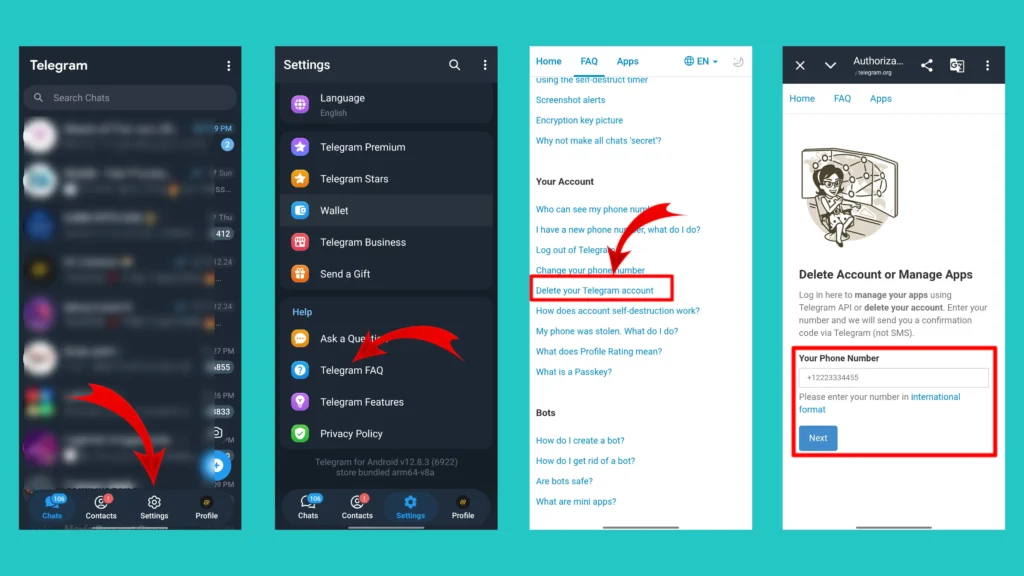
- Open the Telegram app on your Android phone or iPhone.
- Tap on the “Settings (⚙️)” option to open your Telegram account settings.
- Scroll down and tap the “Telegram FAQ” option. This will open Telegram’s FAQ page in your default browser.
- Scroll down and find the “Delete your Telegram account” question under “Your Account” section.
- Inside the answer of this question, you will find the official “Deactivation Page” link. Tap the link to open it in your browser.
- Once you are redirected to the Telegram Account Deactivation Page, follow Method 1 above to permanently delete your account.
Related Article: How to Delete or Edit a Comment on Instagram
How to Automatically Delete an Inactive Telegram Account
If you don’t want to delete your Telegram account right away, Telegram offers another option called Automatic Account Deletion. This feature automatically deletes your account if you don’t use Telegram for a specified period.
Unlike manual deletion, you don’t have to visit the Telegram Deactivation Page. Simply stop using Telegram for the selected duration and your account will be removed automatically.
How to Change the Auto Delete Inactivity Period on Telegram
Telegram monitors your account activity. If you don’t log in or use Telegram for the inactivity period you have selected, your account is automatically deleted. You can set the auto deletion period by following the steps mentioned below.
- Open the Telegram app on your phone.
- Tap on the “Settings (⚙️)” option, available at the bottom right side of the screen.
- Tap on the “Privacy & Security” option.
- Scroll down and find the “Delete My Account If Away For” option.
- Select your preferred inactivity period and done. You have successfully setuped the auto account deletion period for your Telegram account.
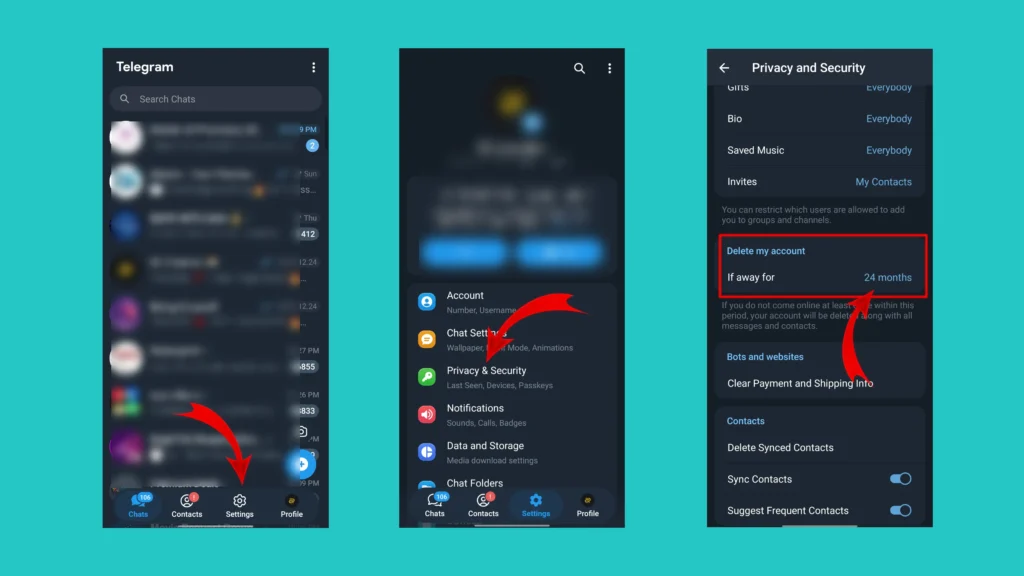
As per the current version of Telegram, you may select duration options such as:
- 1 month
- 3 months
- 6 months
- 12 months
- 18 months
- 24 months
Conclusion
Deleting your Telegram account is a permanent decision, so it is worth taking a few minutes to make sure it’s the right choice.
If you are sure that you no longer need your account, use Telegram’s official Account Deactivation Page and follow the steps outlined in this article above. Before proceeding, remember to save important chats, media files and documents.
Additionally, if you are doing this to take a break from the app, logging out, uninstalling Telegram or using the automatic account deletion feature may be a better alternative.
I hope that this article helped you to delete your telegram account in the right manner. If you found this article helpful then please share it with your friend and let them know about “How to Delete Telegram Account”.
Frequently Asked Questions (FAQs)
1. Can I delete my Telegram account without logging in?
No. Telegram requires you to verify your identity before allowing you to delete your account. You will need access to your registered phone number and in most cases, the verification code sent to your Telegram app.
2. Does uninstalling Telegram delete my account?
No. Uninstalling Telegram only removes the app from your device. Your account, chats, contacts, and groups remain active until you permanently delete the account.
3. How long does it take to delete a Telegram account?
If you delete your account using Telegram’s official Account Deactivation Page, the deletion happens immediately after you confirm your decision.
4. Can I recover a deleted Telegram account?
No. Once your Telegram account is permanently deleted, it can not be restored. If you register again using the same phone number, Telegram will create a new account instead of recovering the old one.
5. Can I use the same phone number after deleting my Telegram account?
Yes. After deleting your account, you can create a new Telegram account using the same phone number.
6. What is Telegram’s Account Deactivation Page?
The Account Deactivation Page is Telegram’s official web page that allows users to permanently delete their Telegram accounts after verifying their identity.
No. Currently Telegram doesn’t provide a direct “Delete Account” button inside the app.
[…] Related Article: How to Delete a Telegram Account Permanently […]