
If your Instagram Reels are getting fewer views than expected, you may have already tried changing your hashtags, posting at different times or making better thumbnails. But before you start changing your entire content strategy, there are a few Instagram settings worth checking.
Some of these settings can affect how your account or content can be discovered, while others can give your Reels additional opportunities to reach people outside your existing audience.
Although, there is no secret Instagram setting to go viral, can guarantee millions of views or make every Reel go viral. Your content still needs to be interesting enough for people to watch, share, save or interact with.
In this blog article, we will look at 5 Instagram settings that you should check if you want to increase your reach and get more views.
Quick Overview: 5 Instagram Settings to Go Viral
Here are the five settings that we are going to discuss in this article
- Check your Account Status
- Review followers flagged by Instagram
- Share your Instagram Reels to Facebook
- Allow public photos and videos to appear in search engine results
- Turn on account suggestions on profiles
Let me explain each one setting and help you understand why it may be useful.
📝 Note: Instagram frequently changes the names and locations of its settings. The options may also vary between accounts. I’ve included the settings and their purpose below, but check the exact options available on your account before changing them.
1. Check Your Instagram Account Status
Instagram’s Account Status section can show whether there are problems with your account or content that could affect your access to certain features or recommendations. This is particularly important if your Reels suddenly stop reaching non-followers or you notice a significant drop in reach.
Instead of guessing whether something is wrong with your account, Account Status gives you a place to check. Now you might be thinking about how you will check your Instagram account status. Well! Here are the steps below to do so.
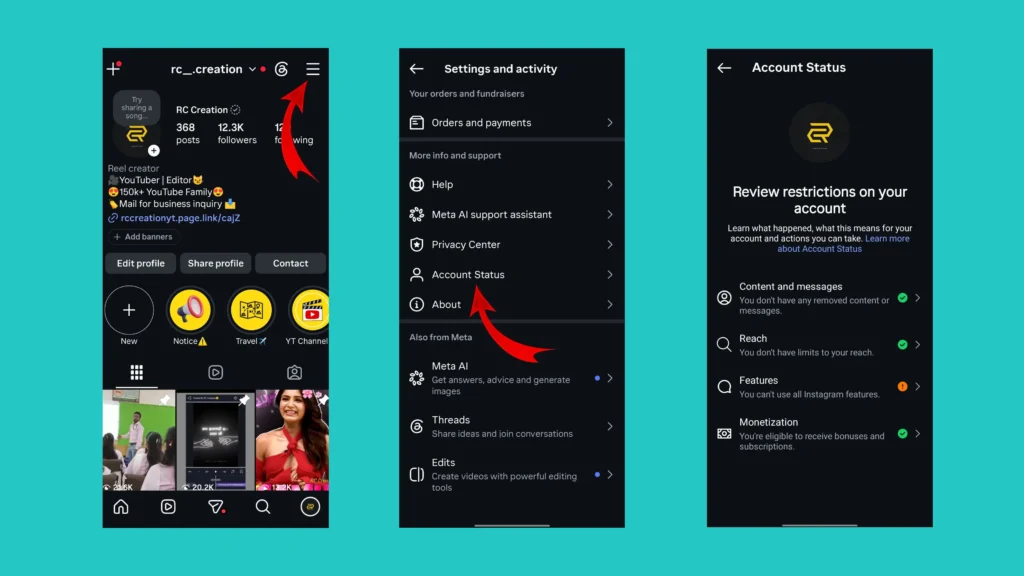
How to Check Instagram Account Status
- Open the Instagram app on your phone.
- Tap on your profile picture available at the bottom right corner.
- Open the settings and activity page by clicking on the three horizontal lines available at the upper right corner.
- Scroll down and look for the “Account Status” option.
Depending on your account and the current Instagram version, you may see information about things such as:
- Content and messages
- Reach
- Features
- Monetization
If Instagram shows that something needs your attention, read the information carefully instead of immediately assuming that your account has been “shadowbanned.”
Why Should You Check Account Status?
One of the biggest mistakes creators make is trying to fix their reach without first checking whether Instagram has identified an issue with their account or content.
Account Status won’t magically increase your views. What it can do is help you identify potential restrictions or eligibility issues that you may otherwise overlook.
So, if you are struggling with reach, make Account Status one of the first things you check.
2. Review Followers Flagged by Instagram
The next setting is something many Instagram users may not check regularly. Instagram can identify certain accounts that it considers suspicious or potentially unwanted. You can review these accounts and decide whether you want to keep or remove them.
Should You Remove Every Flagged Follower? Not necessarily. Don’t remove people simply because Instagram has placed them in a review list. Look at the accounts first and decide whether they appear to be genuine users, spam accounts or accounts you simply don’t want following you.
For example, if you notice obvious spam accounts, suspicious profiles or followers you don’t recognize, removing them can help you keep your follower list cleaner.
However, there’s an important point to remember: Removing followers is not a guaranteed method for increasing your Instagram reach. A healthy and relevant audience is useful for any creator, but your content still needs to perform well to reach a much larger audience.
Related Article: How to Know If Someone Restricted You on Instagram
Instagram and Facebook are both part of Meta and Instagram allows eligible users to share content across the two platforms. If you already create a Reel for Instagram why limit its potential audience to Instagram alone?
You can connect your Facebook account and enable Reel sharing so that your Instagram Reels can also be viewed on Facebook.
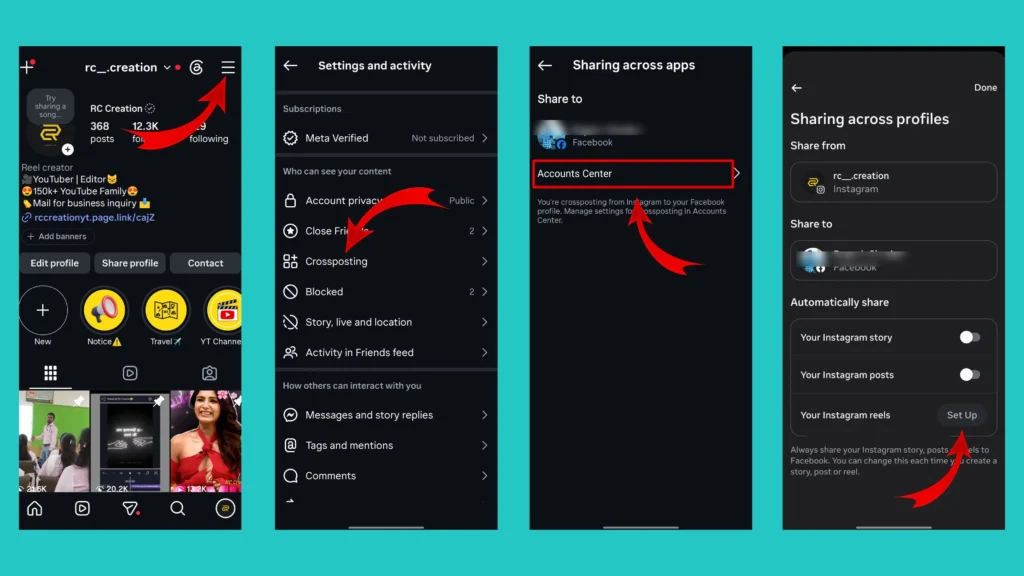
How to Turn On Instagram Reel Sharing to Facebook
You can follow below mentioned steps to enable automatic reel sharing on Facebook. The exact menu may vary depending on your account and Instagram’s current interface but the option is generally available through Instagram’s cross-posting or sharing settings.
- Go to your profile section.
- Access the Instagram account settings page by tapping on the horizontal three lines available at the top right corner.
- Scroll down and tap on the “Crossposting” option.
- Then tap on the “Account Center” option. You can manage the crossposting settings through your account center.
- You will see the “Your Instagram reels” option under the “Automatically share” section.
- Enable it.
Done! Now your Instagram Reels are to be automatically shared to Facebook.
Does Sharing Reels to Facebook Guarantee More Views? The quickest and simple answer is “No”. But it gives your content another potential distribution channel.
A Reel that doesn’t get much attention from your Instagram followers may still find viewers on Facebook. Your results will depend on the content, audience, recommendations and how people interact with the Reel.
4. Allow Public Photos and Videos to Appear in Search Engine Results
This is probably the most interesting setting on our list if you are interested in getting discovered outside Instagram. Instagram provides an option related to allowing public photos and videos to appear in search engine results for eligible accounts.
Enable Setting to Appear in Search Engine Results
Most Instagram creators think about discovery only inside Instagram. Usual workflow on Instagram is, someone searches for a topic then Instagram recommends a Reel and they watch it. But search engines such as Google provide another way people can discover information online.
If eligible public Instagram content can appear in search results, enabling this option may give that content another potential discovery path. Below are the steps that you can follow to enable this setting.
- Open your account setting page by following the steps mentioned earlier.
- Scroll down and find the “Account Privacy” option.
- Turn on the toggle for “Allow public photos and videos to appear in search engine results”.
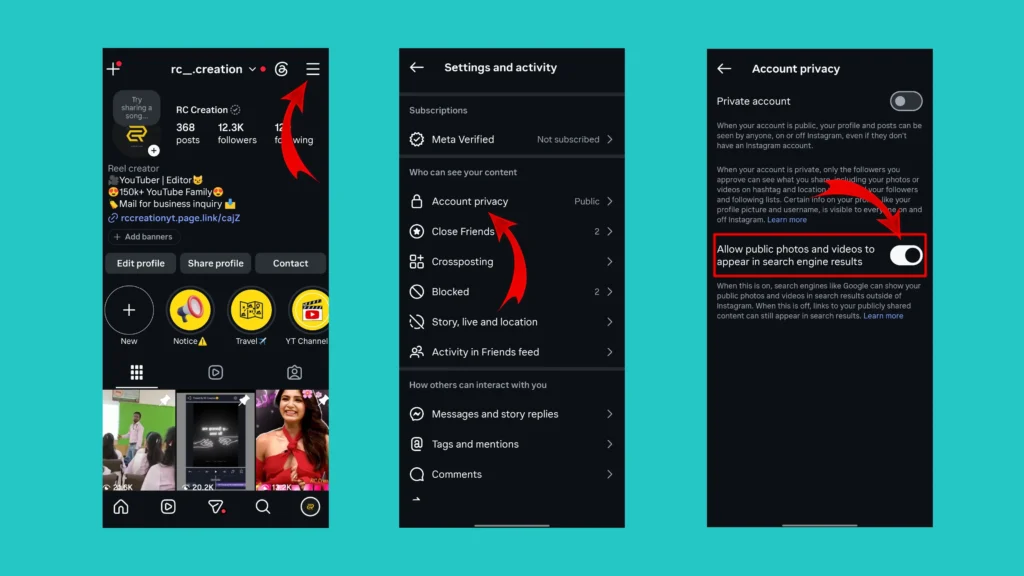
However, don’t misunderstand what the setting means. Turning it on does not mean that every Instagram photo or Reel will automatically appear on Google. It also doesn’t guarantee a first-page ranking.
If your goal is to make your public Instagram content discoverable in as many legitimate places as possible, this is certainly a setting worth checking.
5. Turn On “Show Account Suggestions on Profiles”
The fifth setting is particularly interesting for people who want to gain new followers. Instagram has an option called Show account suggestions on profiles. The setting relates to whether account suggestions can appear when people visit profiles.
In simple words, it can help make your account eligible to be suggested alongside other accounts that users may be interested in.
Why Can Account Suggestions Help?
Imagine someone discovers a creator in your niche. They visit that creator’s profile and Instagram shows suggestions for other accounts. If your account is eligible to appear among those suggestions, you have another potential way to get discovered by someone who doesn’t already follow you.
The steps to turn these settings on are mentioned below.
📝 Note: These settings can only be turned on through Desktop. This option is not available on the Instagram app.
- Go to the Instagram login page and enter your Instagram account credential to log in to your account.
- Click on the profile option available on the lift side navigation bar.
- Click on the “Edit Profile” option
- Scroll down and turn on the toggle for “Show account suggestions on profiles”.
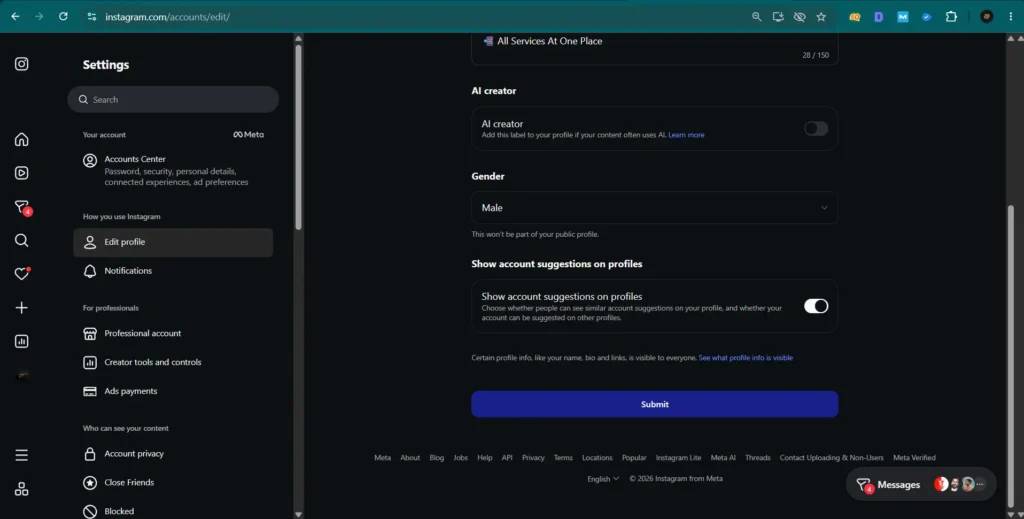
Done! This setting simply gives you an additional opportunity to participate in Instagram’s account-suggestion system.
Final Thoughts
There is no magic switch that suddenly turns an Instagram account into a viral account. However, that doesn’t mean Instagram settings should be ignored.
The five settings covered in this article are worth checking if you are trying to increase your chances of being discovered:
- Account Status
- Flagged followers
- Reel sharing to Facebook
- Search engine visibility for public content
- Account suggestions on profiles
Think of these settings as making sure your account is ready for discovery, rather than as a shortcut to viral success. After that, put your energy into what matters most: creating content that people actually want to watch, share, save, and come back to.
And don’t get discouraged if one Reel doesn’t perform well. Instagram growth rarely happens because of a single setting or a single post. Keep experimenting, learn from your Insights, and improve your content with every upload.
Frequently Asked Questions
What Instagram settings should I change to get more views?
You can start by checking your Account Status, reviewing flagged followers, enabling Reel sharing to Facebook, reviewing search engine visibility for public content and checking the account suggestion setting.
These settings don’t guarantee more views, but they can provide additional opportunities for discovery.
No. There is no setting that guarantees viral reach. Content quality, viewer response, relevance, and many other factors influence how widely a Reel is distributed.
Does sharing Instagram Reels to Facebook increase views?
It can give your Reel another potential audience because the content can also be distributed on Facebook. However, it doesn’t guarantee that you will receive more views.
What is Account Status on Instagram?
Account Status is an area where Instagram can show information about certain content or account issues, including restrictions or other limitations that may affect features or recommendation eligibility.
Why are my Instagram Reels getting low views?
There isn’t one universal reason. Low views can be related to the content itself, audience interest, viewer retention, engagement, recommendation eligibility or many other factors.
Start by checking your Account Status and Insights before making major changes.