

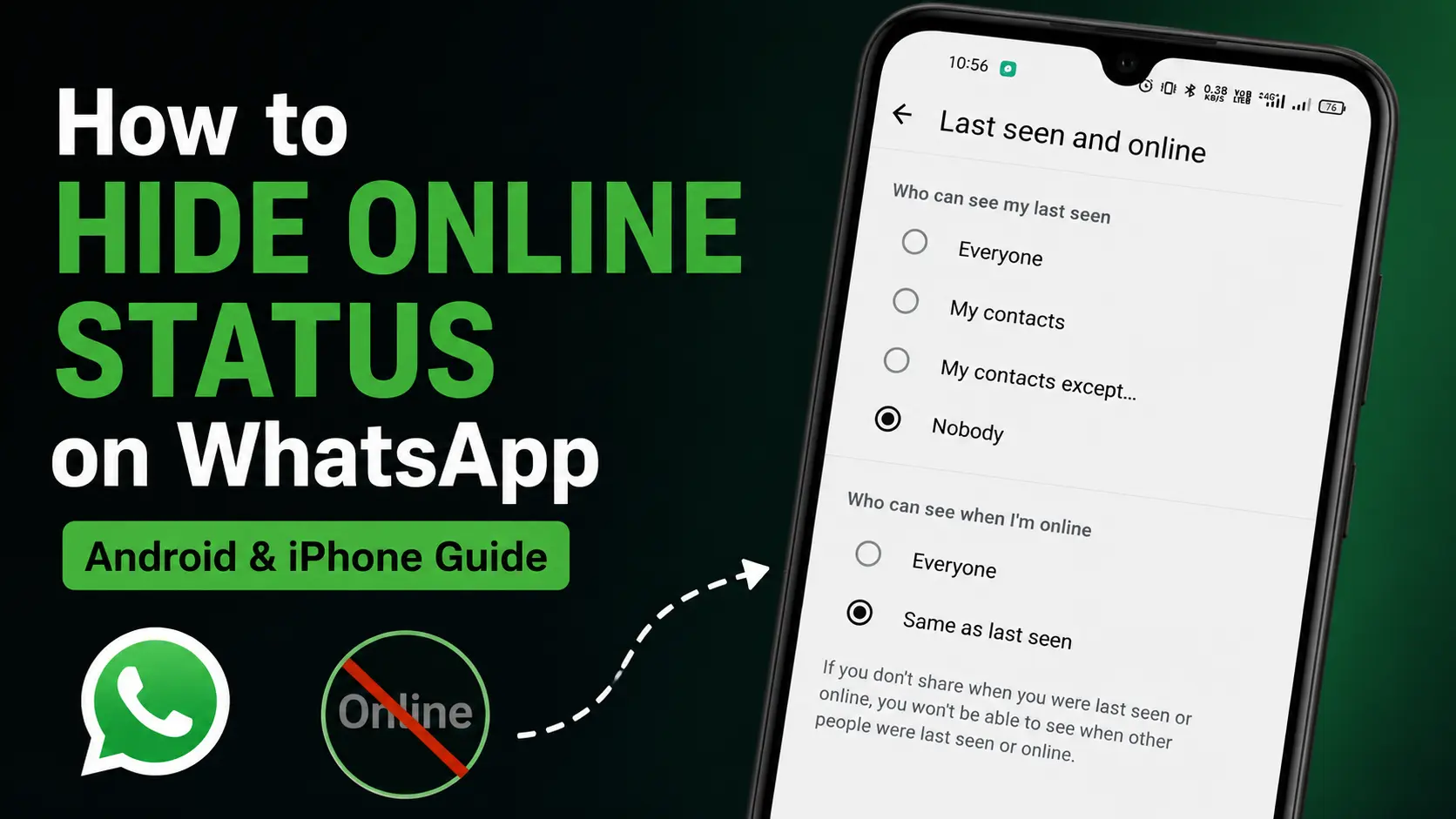
Want to hide your online status on WhatsApp? We got you! If you don’t want other people to know when you are using WhatsApp, you can change your privacy settings to control who can see your Last Seen and Online status.
WhatsApp allows you to choose who can see when you were last active and whether people can see when you are currently online. You can hide these details from everyone or exclude specific contacts.
In this guide, we will show you how to hide your online status on WhatsApp step by step on both Android and iPhone. We will also explain the difference between Last Seen and Online, how to hide your status from specific people and what changes after you turn these settings on.
💡Quick Answer: To hide your online status on WhatsApp, open WhatsApp → Settings → Privacy → Last Seen and Online. Choose who can see your Last Seen, then set Who can see when I’m online to Same as Last Seen. Done!
What Is the Difference Between Last Seen and Online on WhatsApp?
Before changing your privacy settings, it is important to understand the difference between last seen and online.
- Last Seen
Last Seen tells other people when you were last active on WhatsApp. (For example, Last seen today at 6:30 PM). This does not mean you are using WhatsApp right now. It only shows the last time you were active as per your privacy settings.
- Online
The Online indicator tells others that you are currently using WhatsApp. When someone opens your chat while you’re using WhatsApp, they may see online below your name. These are two separate pieces of information, which is why WhatsApp provides separate settings for them.
How to Hide Your Online Status on WhatsApp
I hope you understood the difference between Last Seen and Online. Now lets see how you can hide your Online status on WhatsApp. The process is similar on Android and iPhone, although the first step for accessing Settings is different. Let’s look at both methods.
How to Hide Online Status on WhatsApp on Android
Follow the below mentioned steps if you are using WhatsApp on an Android phone.
- Open the WhatsApp app on your Android phone.
- Tap the three dot menu available at the top-right corner. Then select the Settings option.
- Tap on the Privacy option. This section contains the privacy controls for your WhatsApp account.
- Then tap the “Last Seen and Online” option.
- Under “Who can see my last seen”, choose the option that suits you. You may see options such as:
- Everyone
- My Contacts
- My Contacts Except…
- Nobody
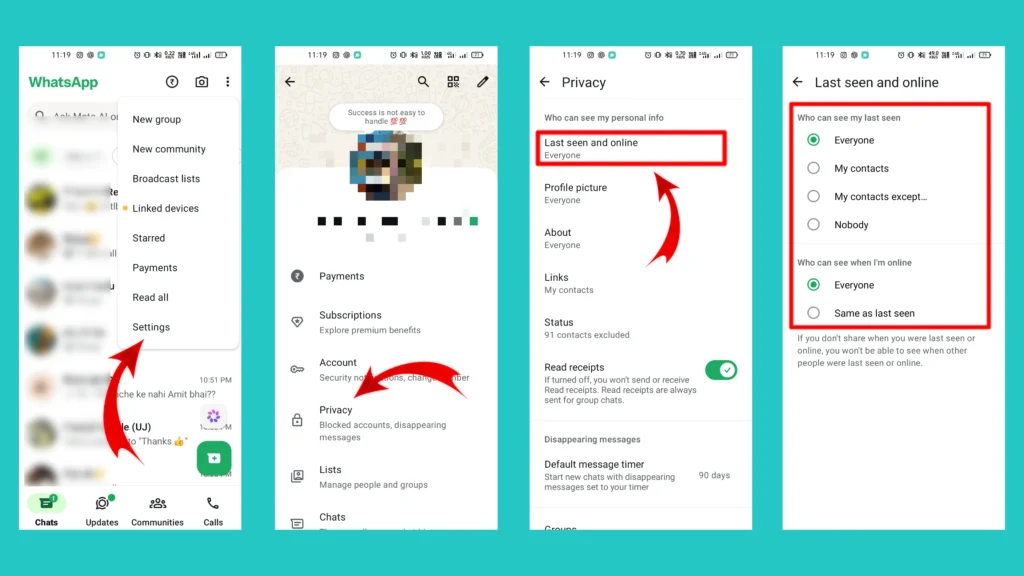
If you want to hide your activity from everyone, select “Nobody”. If you only want to hide it from certain people, choose “My Contacts Except…” and select the contacts you want to exclude.
- Now under the section “Who can see when I’m online”, Select “Same as Last Seen”
If you selected “Nobody” for Last Seen, choosing “Same as Last Seen” will prevent people from seeing your Online status through this setting. If you selected “My Contacts Except…”, your Online visibility will follow that selection as well.
🎯Tested by Medzix: We verified these steps using the latest available version of WhatsApp at the time of writing.
Related Article: WhatsApp Username – How to Create on Android and IOS
How to Hide Online Status on WhatsApp on iPhone
If you are using WhatsApp on an iPhone, follow the below steps.
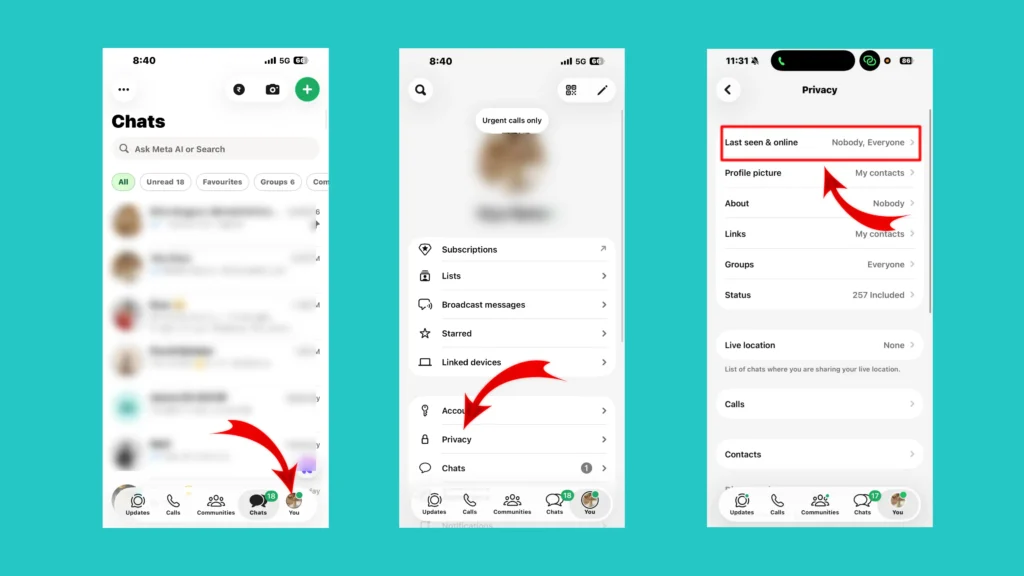
- Open WhatsApp on your iPhone.
- Tap your profile photo on the bottom navigation bar.
- Select the Privacy option.
- Tap on the Last Seen and Online.
- Under “Who can see my last seen”, select your preferred option.
To hide it from everyone, select “Nobody”. To hide it from specific contacts, choose “My Contacts Except…” and select the people you want to exclude.
- Under “Who can see when I’m online”, select “Same as Last Seen”. Your Online visibility will now follow the Last Seen privacy setting that you have selected.
How to Hide Your Online Status From Specific People
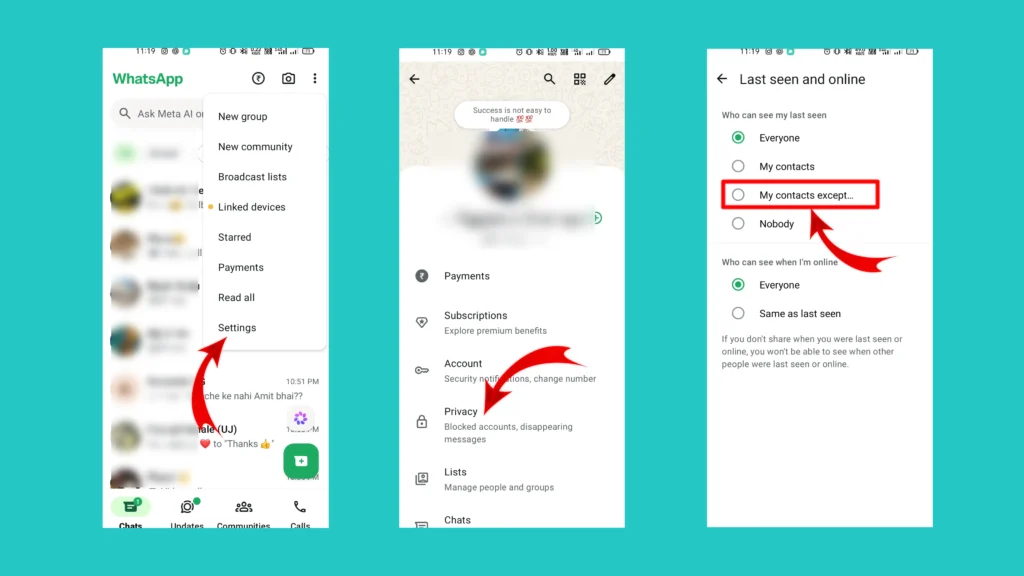
You may want your close friends and family to see you when you are online but don’t want certain contacts to see your activity. Then you don’t necessarily have to hide your Online status from everyone. In that case, use the My Contacts Except… option.
Lets see how you can do this easily.
- Open WhatsApp on your Android or IOS.
- Go to “Settings”. (You can follow the same steps to access settings, shown above)
- Tap on the “Privacy” option.
- Select “Last Seen and Online”.
- Under “Who can see my last seen”, choose “My Contacts Except…”.
- Select the contacts you want to exclude.
- Under “Who can see when I’m online”, select “Same as Last Seen”.
Done! This is a useful option if you want more control over your activity without completely hiding it from everyone.
What Happens After You Hide Your Online Status?
Once you have changed your Last Seen and Online settings, people who aren’t allowed to see your Online status won’t be able to see it according to the visibility rules you have selected.
However, hiding your Online status does not make you completely invisible on WhatsApp. Now what does it means?
For example, it doesn’t automatically:
- Hide your profile picture.
- Hide your About information.
- Stop someone from sending you messages.
- Prevent people from knowing you have read their messages if Read Receipts are enabled.
- Hide your activity in every possible situation.
If you want stronger privacy, you will need to review your other WhatsApp privacy settings separately.
Can You Hide Your Online Status Without Hiding Last Seen?
This is a common question that comes in everyone’s mind. WhatsApp’s Last Seen and Online controls are connected through the available privacy options. The “Same as Last Seen” setting makes your Online visibility follow your Last Seen selection.
So, if you want to restrict who can see your Online status, you will need to configure the Last Seen setting accordingly.
For example: Last Seen: Nobody, Online: Same as Last Seen
Or
Last Seen: My Contacts Except…, Online: Same as Last Seen
The second option is particularly useful if you want to exclude specific people rather than everyone.
Why Can Someone Still See Me Online on WhatsApp?
If someone can still see your Online status after changing your settings, check the following:
- Make sure the settings are configured the way you want.
- Changing your Last Seen setting alone may not be enough for your intended privacy configuration. Check the “Who can see when I’m online” option and make sure it is set appropriately.
- Make Sure You’re Using the Latest WhatsApp Version
If your menu looks different from the steps in this guide, update WhatsApp through your device’s official app store and check the settings again.
Conclusion
WhatsApp’s Online indicator can be useful, but not everyone wants their activity to be visible to other people.
Fortunately, WhatsApp provides privacy settings that let you control who can see your Last Seen and Online status. You can hide these details from everyone or exclude specific contacts, depending on how you want to use WhatsApp.
Just remember that privacy settings often come with trade-offs. Before changing them, consider whether you still want to see other people’s activity information as well.
If you like this article, please share it with your friends. Have any queries; please let us know in the comment section below.
Frequently Asked Questions (FAQs)
1. How do I hide my online status on WhatsApp?
Go to WhatsApp → Settings → Privacy → Last Seen and Online. Choose who can see your Last Seen, then set Who can see when I’m online to Same as Last Seen.
2. Can I hide my WhatsApp Online status from everyone?
Yes. Set your Last Seen visibility to Nobody and your Online visibility to Same as Last Seen.
3. Can I hide my Online status from one person?
Yes. You can use My Contacts Except… to exclude specific contacts from seeing your Last Seen and Online information.
4. Does hiding Online status hide blue ticks?
No. Online status and Read Receipts are separate privacy settings. If you also want to control blue ticks, you’ll need to adjust the Read Receipts setting separately.
Yes. Hiding your Online status doesn’t stop people from sending you messages.
6. Why can’t I find the Last Seen and Online option?
The exact location or wording may differ depending on your WhatsApp version and device. Try updating WhatsApp to the latest available version and look under Settings → Privacy
7. Will someone know if I hide my Online status?
WhatsApp doesn’t send them a notification. However, they may notice that your Online information is no longer visible.