

If you recently opened your Instagram inbox and noticed a small stack of photos or a new feature called Instagram Instants, you’re probably not alone in wondering what it is.
Instagram introduced Instants as a way to share spontaneous, real-time photos with your Close Friends or people you follow who follow you back. The photos are designed to be temporary, after someone opens an Instant, it disappears and unopened Instants are no longer available after 24 hours. Meta also says that Instants can only be captured in real time rather than uploaded from your phone’s gallery.
The feature is useful if you enjoy casually sharing everyday moments. But not everyone wants another photo sharing feature sitting inside their Instagram inbox. Some users may simply want to know how to remove Instant from Instagram, while others may have accidentally sent a photo and are looking for a way to delete or unsend it.
The good news is that Instagram provides options to hide Instants from your inbox, temporarily stop receiving them and in some situations undo or delete an Instant you have sent. In this article, we will explain everything in simple terms.
📝Quick Answer: To turn off or remove Instants from Instagram, Go to Profile → Menu (☰) → Content Preferences → turn on “Hide Instants in Inbox.”
What Is Instant in Instagram?
An Instant is a temporary photo that you can capture and share directly through Instagram. Unlike a regular Instagram post, Story or Reel, Instants are designed for quick, in-the-moment sharing.
Meta describes Instants as a way to share photos with either your Close Friends or mutual followers. A mutual follower generally means someone you follow who also follows you back. There are a few important things that make Instants different from other Instagram content:
- You capture the photo in real time.
- You cannot upload a photo from your phone’s gallery.
- You can add a caption but Instagram does not offer normal photo editing before sharing.
- The recipient can react or reply.
- The photo disappears after it has been viewed.
- An unopened Instant is no longer available after 24 hours.
In simple words, Instagram Instants are meant for sharing quick, unfiltered moments instead of carefully edited content.
What Is the Instagram Instants Feature?
The Instagram Instants feature is located inside Instagram’s messaging experience. You can access it by opening your Instagram inbox and tapping the small pile or stack of photos located at the bottom-right area of the inbox.
From there, Instagram opens the Instants camera.
You can:
- Capture a photo.
- Choose who you want to share it with.
- Send it to your Close Friends or mutual followers.
Recipients can react, reply or send an Instant back to you. The Instants you receive appear in the inbox as a stack of photos and disappear once they have been viewed.
Related Article: How to Know If Someone Restricted You on Instagram
How to Use Instagram Instants
If you want to try the feature before deciding whether to keep it, the process is relatively simple.
Step 1: Open Instagram and tap the Messages or Inbox icon.
Step 2: Look for the small stack of photos in the lower-right area of your inbox.
Step 3: Tap on the camera icon at top right corner.
Step 4: Before sharing, select the available audience.
Depending on the options shown on your account, you can share with:
- Close Friends
- Friends
Step 5: Take a photo using the Instants camera.
Unlike a normal Instagram Story, the idea is to capture the moment as it happens rather than upload and edit an existing image.
Step 6: Once you share it, your selected recipients can see it in their inbox. They can react, reply or send you an Instant in return.
How to Turn Off Instants on Instagram
If you have tried the feature and decided that you don’t want it appearing in your inbox, Instagram provides a setting to hide it.
Follow these steps to turn off Instants on Instagram.
- Open Instagram and tap your profile picture in the bottom-right corner.
- Tap the three horizontal lines (☰) in the top-right corner.
- Scroll through the available settings and open Content Preferences.
If you cannot find it immediately, try using the Settings search option and search for Content Preferences.
- Scroll down and look for “Hide Instants in Inbox”.
- Turn the toggle on.
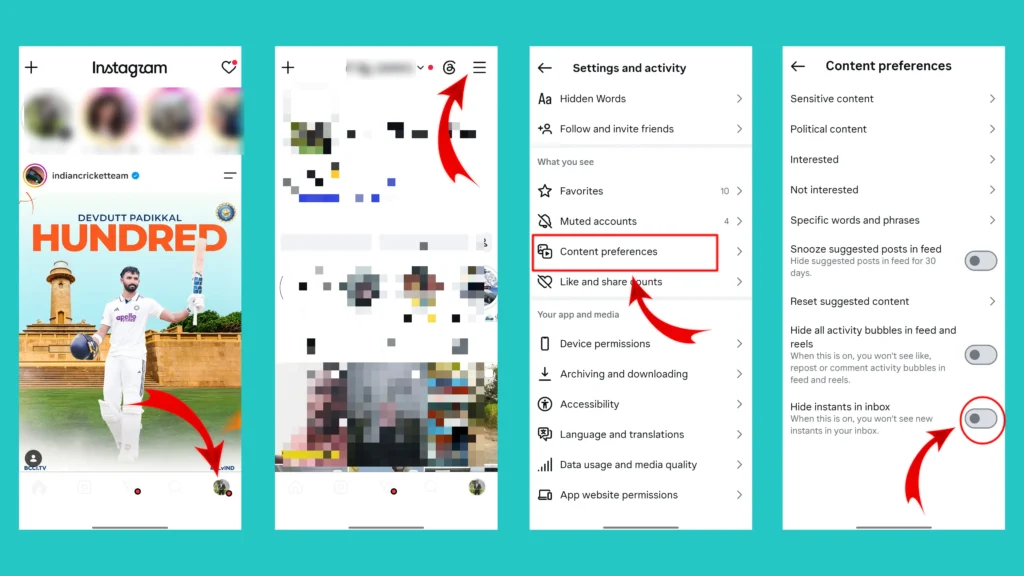
Once enabled, the Instants feature should no longer appear in your inbox and you won’t see new Instants there.
What Happens When You Hide Instants in Your Inbox?
Turning on Hide Instants in Inbox does not delete your Instagram account or affect your normal DMs. It simply hides the Instants feature from your inbox.
According to reports on the feature and Meta’s controls, you will no longer see the Instants section in your inbox when the setting is enabled.
Your regular Instagram features should continue working as usual, including:
- Direct Messages
- Stories
- Reels
- Posts
- Notes
- Normal photo sharing in chats
So, if your main concern is simply getting rid of the new Instants section, this is the setting to try.
How to Delete an Instant in Instagram
If you missed the Undo option, Instagram also keeps your shared Instants in a private archive. Meta says your shared Instants can remain in this archive for up to one year and only you can access it.
You can delete a sent Instant from there. The steps to do so are mentioned below.
- Open your Instagram inbox and access the Instants camera.
- Look for the archive icon available at the top-right corner. Instagram has described this as the area where your previously shared Instants are stored privately.
- Open the photo you want to remove.
- Click on the three dot option available at the top right corner and tap the “Delete Instant” option from the list.
Done! This is how you can delete an Instant in Instagram. According to Meta, deleting an Instant from your archive can unsend it to friends who have not opened it yet.
📌Important Limitation: Deleting an Instant is not a way to make someone “unsee” a photo they have already opened. If the recipient has already viewed it, you should not assume that deleting it afterward will reverse that view.
Related Article: How to Delete or Edit a Comment on Instagram
Can You Completely Disable Instagram Instants?
For most users, the practical way to disable the feature inside the main Instagram app is to enable the “Hide Instants in Inbox” option. This removes the Instants section from your inbox and stops you from seeing new Instants there.
Instagram has also introduced a separate Instants app in select countries. The standalone app is connected to your Instagram account and Instants can work across both experiences.
So, if you are using a separate Instants app as well as Instagram, hiding Instants inside the Instagram inbox should not automatically be treated as disabling every Instants related experience everywhere.
For most people who simply want the feature removed from their regular Instagram inbox, Hide Instants in Inbox is the relevant option.
Instagram Instants vs Stories: What’s the Difference?
At first glance, Instants may sound similar to Instagram Stories because both are temporary forms of content. However, they work differently. Below table explain a basic difference between them.
| Feature | Instagram Instants | Instagram Stories |
| Main purpose | Quick, spontaneous sharing | Temporary public or audience-controlled sharing |
| Photo source | Captured in real time | Can use camera or existing media |
| Editing | Limited | Multiple editing tools available |
| Visibility | Close Friends or mutual followers | Depends on Story privacy settings |
| After viewing | Disappears after being opened | Normally available for up to 24 hours |
| Main location | Instagram inbox | Story area/profile |
Instants are more focused on private, spontaneous photo exchanges, while Stories are designed for sharing content with a broader audience selected through your Story settings. Meta describes Instants as disappearing photos shared with Close Friends or mutual followers, captured in real time without normal photo editing.
Can Someone Screenshot or Save an Instagram Instant?
Meta says that recipients cannot screenshot or screen-record Instants that you share.
However, it is still a good rule to think carefully before sharing anything personal online. No privacy feature should be treated as a guarantee that information can never be copied, remembered, or captured by another method.
No, the friend whom you shared an Instant with can’t save it.
Meta says the Instants you share are stored in a private archive that only you can access for up to one year. This archive can also be used to create a recap that you can share to your Instagram Story.
So although an Instant disappears from the recipient’s view after it is opened, Instagram provides the sender with a private archive of their shared Instants.
What Should You Do If You Cannot Find “Hide Instants in Inbox”?
If you have searched through Instagram settings and cannot find the option, try these steps.
- Make sure you are using the latest available version of the Instagram app.
- Open Instagram settings and search for “Content Preferences” or “Instants”
This can be faster than manually scrolling through a long list of settings.
- Instagram features do not always appear at exactly the same time for every user, account, device or region. If you don’t have Instants in your inbox, you may not need to disable it.
- After changing the setting, close and reopen Instagram if the Instants section does not disappear immediately.
Final Thoughts
Instagram Instants are designed for something very simple, sharing an unplanned moment without turning it into a polished Instagram post or Story.
You may enjoy that idea or you may feel that Instagram already has enough ways to share photos. Either way, you now have options.
If you want to keep using Instants, you can capture and share spontaneous photos with your selected audience. If you accidentally send one, use the Undo option immediately or check your private archive. And if you simply don’t want Instants appearing in your inbox, turn on “Hide Instants in Inbox” from Content Preferences.
The most important thing is to understand how the feature works before using it. Since Instants are designed around quick sharing, knowing where the audience setting and Undo option are can prevent an accidental photo from reaching the wrong people.
Frequently Asked Questions (FAQs)
What is Instant in Instagram?
Instagram Instant, or Instants, is a feature for sharing spontaneous, disappearing photos with your Close Friends or mutual followers. The photo disappears after it has been viewed, while unopened Instants are no longer available after 24 hours.
What is the Instagram Instants feature?
It is a photo-sharing feature designed for real-time, minimally edited photos. You capture the image directly through Instagram’s Instants camera and share it with selected people.
How do I remove Instant from Instagram?
If you want to remove the feature from your inbox, go to:
Profile → Menu (☰) → Content Preferences → Hide Instants in Inbox
Then turn the option on.
How do I off Instant in Instagram?
Open Instagram, go to your Profile, tap the three-line menu, open Content Preferences, and enable Hide Instants in Inbox.
How do I disable Instants on Instagram?
Enable the Hide Instants in Inbox option from Instagram’s Content Preferences. This hides the Instants feature from your inbox.
How do I delete an Instant on Instagram?
You can use the Undo option immediately after accidentally sending an Instant. You can also delete a sent Instant from your private archive, which can unsend it for recipients who have not opened it yet.
Can I delete an Instant after someone has opened it?
You should not assume that deleting an Instant can undo the fact that someone has already viewed it. Meta specifically says archive deletion can unsend an Instant to friends who haven’t opened it yet.
Do Instagram Instants disappear?
Yes. An Instant disappears after it has been viewed, and Meta says it also cannot be viewed after 24 hours.
Can I upload a photo from my gallery to Instagram Instants?
Meta says Instants are captured in real time and cannot be uploaded from your phone’s photo gallery.
Can I edit an Instagram Instant?
You can add a caption, but Meta says you cannot make further edits before sharing.
Can I turn Instagram Instants back on?
Yes. Go back to Content Preferences and turn off the Hide Instants in Inbox setting.