

Facebook is one of the best social media platforms for sharing photos, videos, stories, etc., with your online friends. But the first question that comes to the mind of users while using this social media platform is “user privacy.” So now the question is, does Facebook notify screenshots?
The short answer is generally no. Facebook typically doesn’t send screenshot notifications for regular posts, photos, profiles, or Stories. However, Messenger works differently in some situations, particularly with disappearing messages in end-to-end encrypted chats.
In this guide, we’ll explain when Facebook sends screenshot notifications, whether someone can know you’ve screenshotted their Story or post, and what you should know about screenshot notifications in Messenger.
Does Facebook Notify Screenshots in 2026
The shortest answer to this question is “NO.” Facebook does not inform the user when you take screenshots of that user’s profile’s stories, posts, or even photos. When someone screenshots your profile’s posts, photos, and stories, the same conditions apply to you.
Unlike Snapchat and Instagram, Facebook lacks the feature of notifying screenshots. It is also very difficult for Facebook to find out if someone takes a screenshot. The main reason behind this is that Facebook is predominantly used on browsers. However, screenshot notifications can work differently in certain Messenger disappearing message chats.
Does User Get Notified When You Screenshot a Story on Facebook?
According to the user’s experience, stories are one of the best features of Facebook. Facebook stories only last for 24 hours which makes them more popular. As people’s moods can swing anytime without any reason. In that case, they can use the Facebook story features rather than normal posts to share their mood with their online friends because of the time duration of stories.
Facebook does not send any alert if you screenshot anyone’s story. We already mentioned above that Facebook lacks the screenshot notification feature. You can easily take a screenshot of anyone’s story on your android/IOS phone or even on your desktop. Like you, any other user can also capture the screenshot on your story, and you wouldn’t be informed of it. Facebook stories will disappear after 24 hours, so you can save the photos shared through the Facebook stories for a long time by taking the screenshot.
Related Article: How to Find Memories on Facebook
Restrict Other From Taking Screenshot of Your Facebook Profile Picture
Yes, you read it right. Facebook doesn’t inform you if someone takes a screenshot of your profile, but still, there’s a way to protect your profile from being screenshotted. You can turn on the Facebook profile picture guard. Facebook profile picture guard is a new feature that restricts the other user from sharing and downloading your profile picture.
However, these features should not be treated as a guarantee that nobody can capture or reproduce an image. Someone can always use another device to photograph a screen. Now you might be thinking, how do we turn on the profile picture guard? Well, It is very easy to turn on the profile guard feature. Just go through the below step to do so.
- Tap on your profile picture from your Facebook page
- Tap on your profile picture; a pop-up window will open
- Choose the “Turn On The Profile Picture Guard” option
- Tap next and save
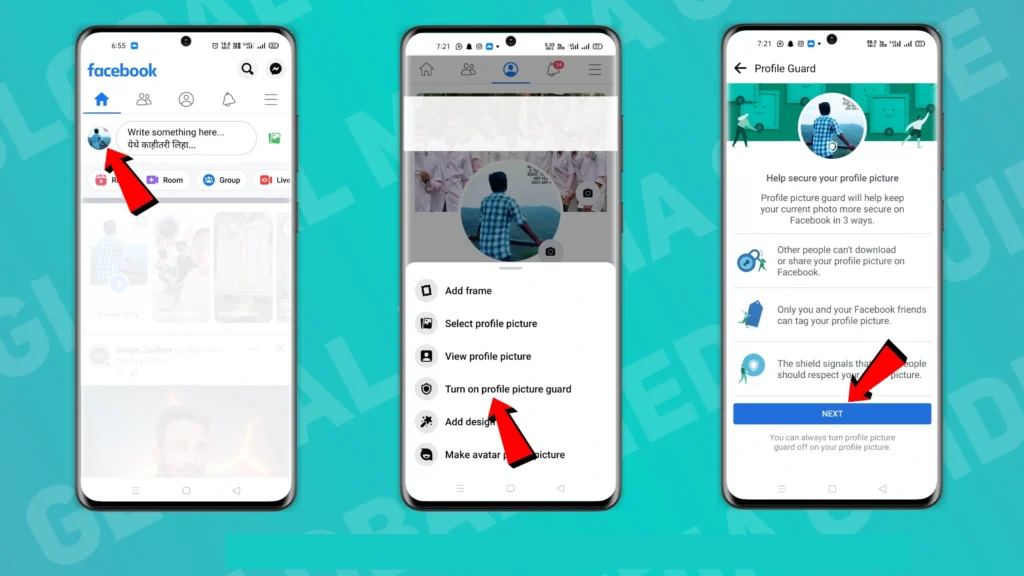
Done, you just turned on the profile picture guard feature. We think that using this available feature is far better than having nothing to protect your privacy.
How to Save Photos Without Taking Screenshots On Facebook?
The best alternative to taking a screenshot of photos is to save those photos in the gallery. You can easily save any photo available on Facebook into your gallery. Follow the below steps to do so.
- Open the Facebook app
- Find and tap on that photo that you want to save
- Now tap on three dots available on the upper right corner
- Choose save or share externally to your gallery
If you are taking a screenshot of any posts or photos on Facebook to just show them to your friend. Then I might have a better way for you. You can directly share the posts and photos with your friend by following the below simple steps.
- Start by opening the Facebook app
- Find the photo which you want to share
- Tap on the share button and select the platform on which you want to share this particular post or photo
We hope you will also like this way to share Facebook posts and photos with your friend.
On a final note, Facebook doesn’t notify you when someone takes a screenshot of your posts and stories. At the same time, you can protect your profile picture by enabling some features shared in this article. If you like this article, please share it with your friends.
Have any queries; please let us know in the comment section below.
Frequently Asked Questions (FAQs)
Does Facebook messenger notify screenshots?
No, Facebook does not have any feature to notify you of a screenshot taken in messenger, which means that your friend can take a screenshot of your conversation without knowing you.
Can we save the Facebook photos in our gallery?
Yes, you can easily save Facebook photos to your gallery. Tap on the photo and click on the three dots. Next, select the save option to save the photo to your gallery.
Does Facebook notify someone when you screenshot their Story?
No. Facebook generally does not send a notification when you take a screenshot of someone’s Story. The person who posted the Story will not be notified that you captured it.
Can someone know if I screenshot their Facebook Story?
Generally, no. Facebook does not normally notify someone when you screenshot their Story. However, this is different from certain disappearing-message features in Messenger, where screenshot notifications may be triggered if detected.
Does Facebook notify screenshots on a computer?
Generally, no. Facebook does not normally notify users when someone takes a screenshot of regular posts, photos, profiles, or Stories, whether the screenshot is taken on a phone or a computer.
[…] Related Article: Does Facebook Notify Screenshots? […]
[…] Related Article: Does Facebook Notify Screenshots? […]