

If you want to change group name on Facebook, you are at the right place. If you are an admin, you can usually update your group’s name from the Group Settings on Facebook. The exact steps may vary slightly depending on whether you are using Facebook on a computer or the mobile app. In this guide, we will show you how to change your Facebook Group name on desktop, Android and iPhone, along with some important things to consider before renaming your group.
Facebook is one of the best and most prominent social media platforms to connect with people worldwide. You can send requests individually, follow pages, create a group to communicate with many people at a time, etc. Facebook groups have some unique features apart from standard Facebook features, making them unique.
Eligibility Criteria of Changing Facebook Group Name
Facebook has set some criteria for changing group names on the platform. So you need to fulfill the below-mentioned criteria in order to change your group name on Facebook.
- You may have created that group, or the group creator may have made you an admin. (In short, you should be the administrator of that group).
- You can change a group name once in 28 days. So if you have changed your group name recently, you have to wait for 28 days from the day of changing the group name.
- Your group name must follow the Facebook Community Guidelines.
If you are a Facebook group member, you don’t have permission to change the group name.
How to Change Facebook Group Name on a Computer
There may be several reasons behind changing your Facebook group name, but the most common among them is that the group creator or administrator wants to change the URL of a group. A shortened group link will be far better to remember for anyone. So here are the steps to change the group name on Facebook using your Mac or Windows computer.
- Open any browser on your computer and go to the official Facebook website.
- Log in to your account by entering the username or phone number and password.
- Click on the “Groups” option available on the left sidebar. If you can’t find the group option in the left sidebar, look into the “Your Shortcuts” section below.
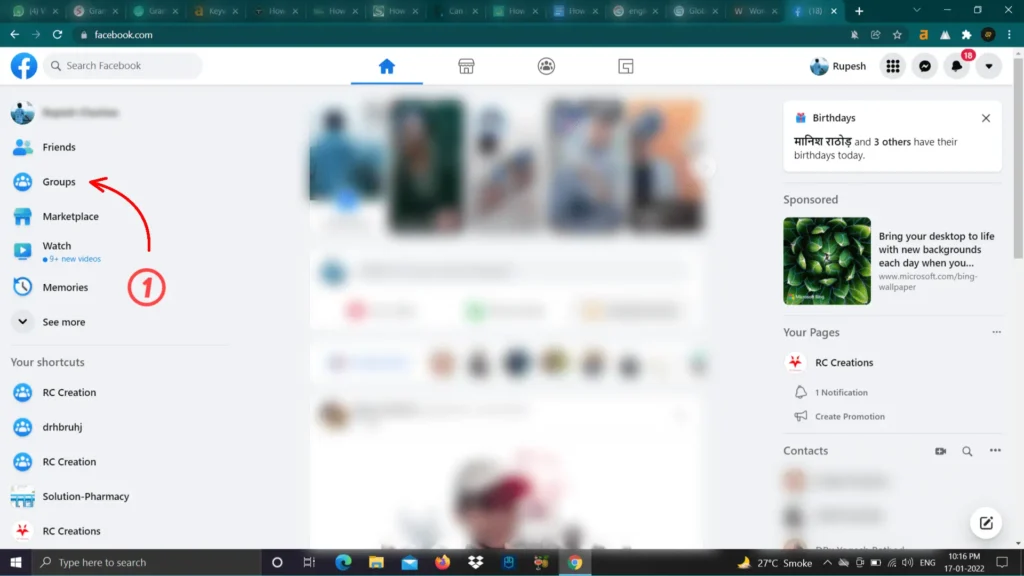
- Select the group that you want to rename.
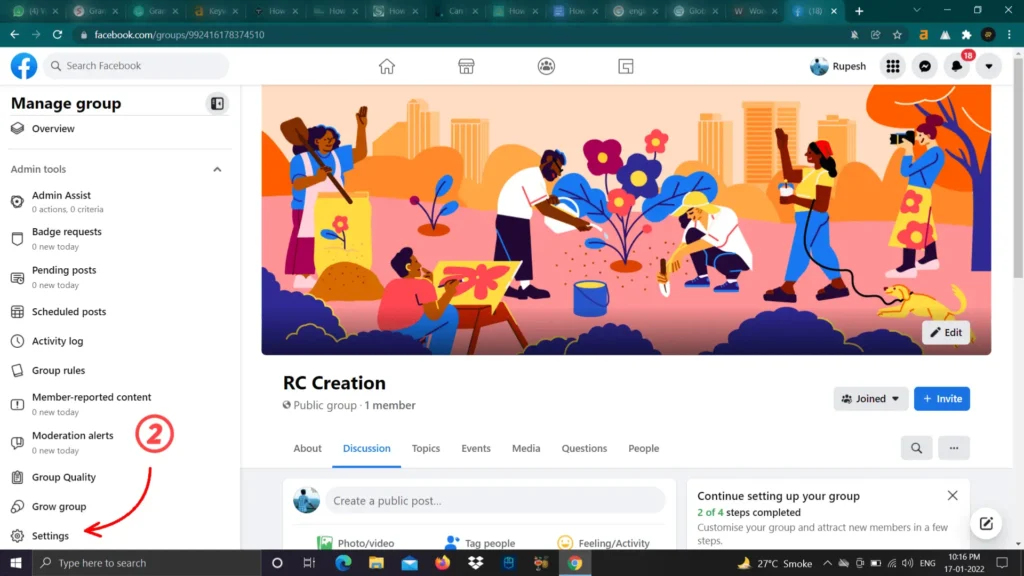
- In the admin tools section (Available in the left sidebar), find the “Settings” option and click on it.
- Click on the pencil icon beside the “Name and Description” option in the setup group section.
- Now enter a new name for your group and save it.
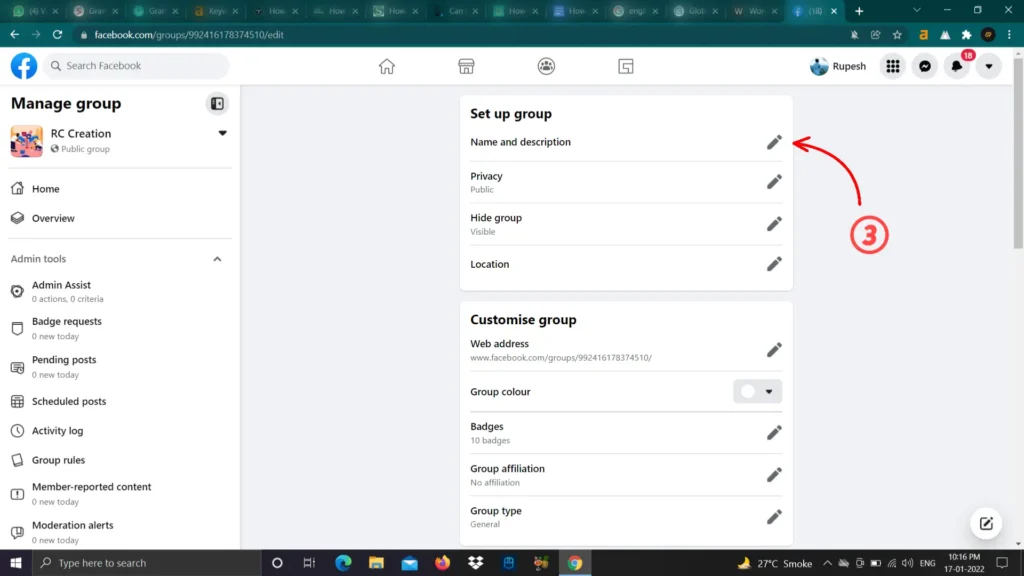
Done, you just changed your group name. Facebook will automatically notify all the group members about the group name change.
Related Article: Does Facebook Notify Screenshots?
How to Change Group Name on Facebook Using Android and iPhone
You can use the Facebook app to rename your Facebook group name on android and IOS. Go through the below steps to change the group name on mobile.
- Open your Facebook app and tap on the menu icon (Three lines available on the upper right corner).
- Tap on the group option. You will also find your groups under the “Your Shortcuts” section.
- Choose the group you would like to change its name. Remember that you must be an administrator to change the group name.
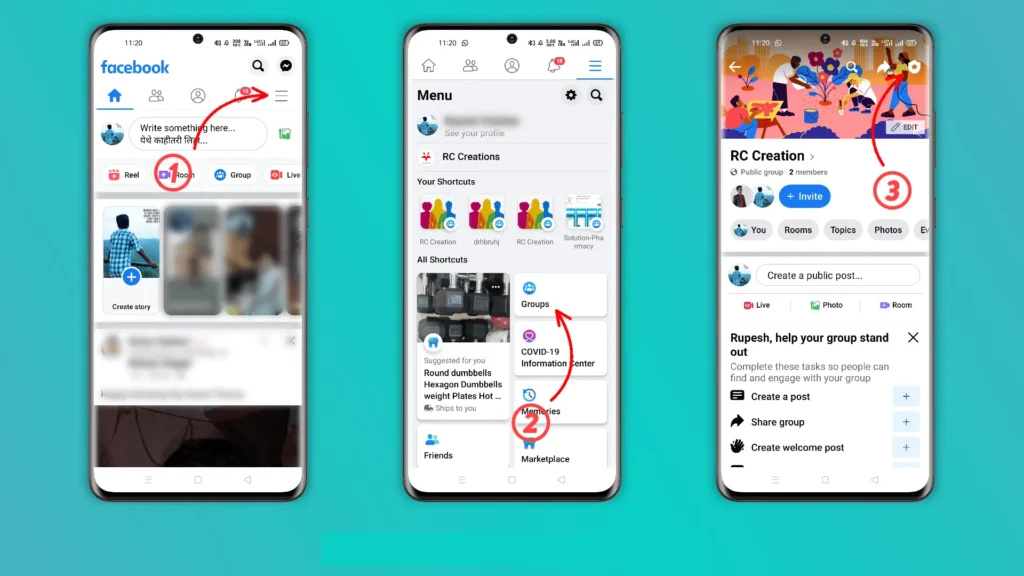
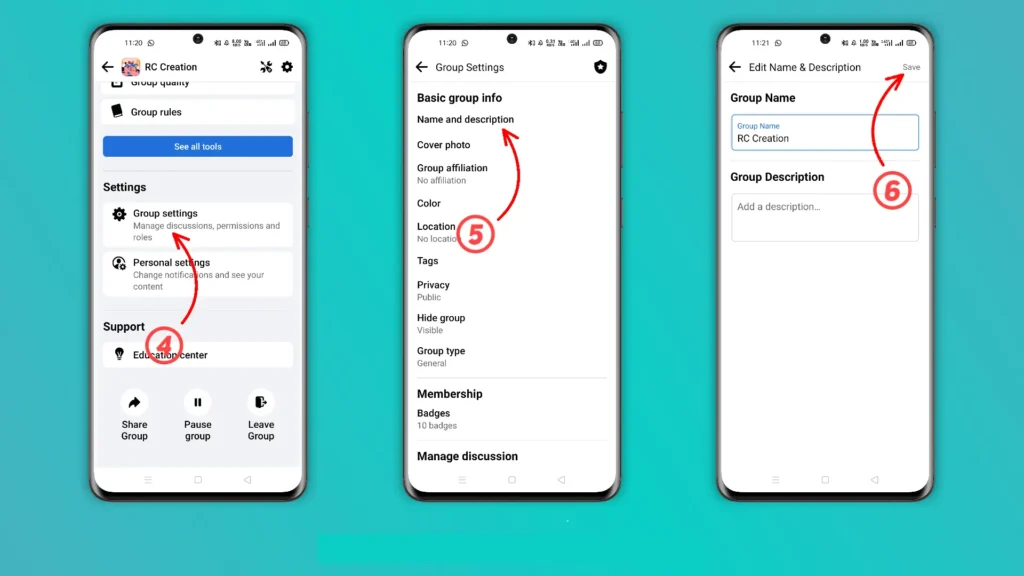
- Tap on the shield-shaped icon available in the upper right corner. Scroll down and tap on the “Group settings” option.
- Under the basic group info, you will find the “Name and Description.” Tap on it.
- Rename your group name and tap on save.
If you are using a Facebook lite app, go to the menu and select the group option. Now select the group and click on the “Manage‘ option. Tap on “Group settings” and enter the new group name under the “Name” section. Save the changes by tapping on the “Done” option available in the upper right corner.
Impact of Changing Group Name on Facebook
Changing the group name may affect the user who usually uses the Facebook search option to find your group. It comes into consideration only if your group is famous on Facebook. It might not be considered seriously if you have recently started the group. A user who has joined many Facebook groups may suffer while finding your group.
Keep in mind that your group members get informed automatically by a notification that you have changed the group name. Once you change the group name, you can’t change the name of your group for the next 28 days. A group with more than 5000 members also can’t change the group name.
Consider informing your group member about the group name change update to overcome the confusion. Keep sharing valuable content with your group members and keeping them engaged with your group.
Conclusion
You can easily change the group name on Facebook, but the only condition is that you must be an administrator of that group. I hope you find the best way to change your group name in this article. Please do share this article with your friends and family.
Have any queries; Please feel free to share them with us in the comment section below.
Frequently Asked Questions (FAQs)
Can anyone change the name of a Facebook Group?
No. You generally need to be a Facebook Group admin to change the group’s name. Regular group members do not have permission to rename the group.
How do I change my Facebook Group name?
Open your Facebook Group and go to the Group Settings. Look for the option related to the group’s Name and Description, enter the new name, and save your changes. The exact location of these options may vary depending on whether you’re using Facebook on a computer or the mobile app.
Can I change my Facebook Group name on my phone?
Yes. You can change your Facebook Group name using the Facebook mobile app if you have the necessary admin permissions. Open your Group, access the Group Settings, find the name and description settings, enter the new name, and save the changes.
Can a Facebook Group member change the Group name?
No. A regular member cannot change the name of a Facebook Group. This option is generally available only to Group admins.
Can I change my Facebook Group name to anything I want?
No. Your Group name should follow Facebook’s policies and Community Standards. Avoid using misleading, abusive, or prohibited terms, and choose a name that accurately represents the purpose of your Group.
What happens to my Facebook Group’s members after changing its name?
Changing the Group name does not normally remove existing members. Your members should remain in the Group, but they may see the new name when interacting with it. Consider informing them about the change to avoid confusion.