

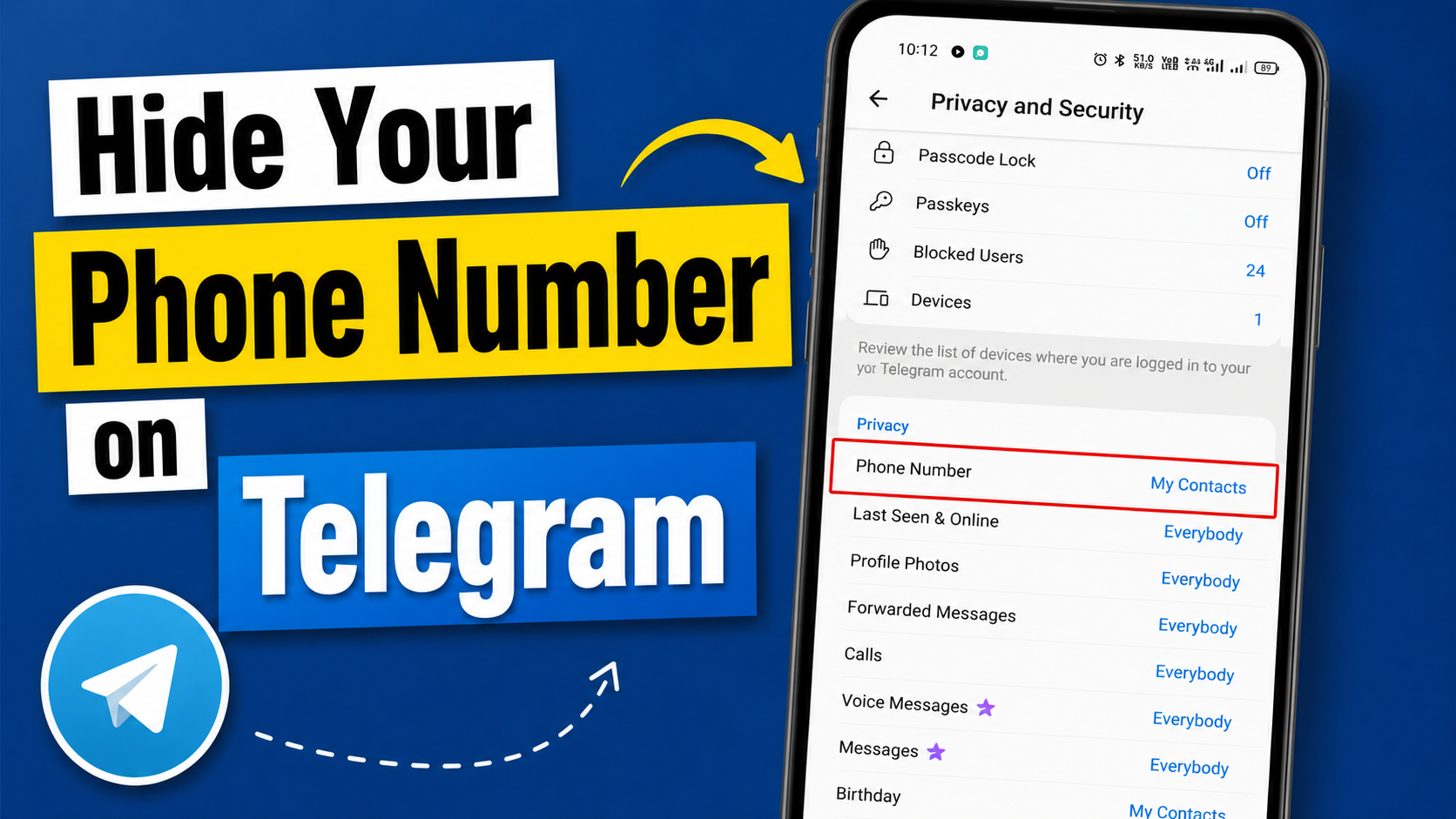
Telegram is popular among people who value privacy, but there is one thing that can still make some users uncomfortable and that is their phone number.
The good news is that you do not have to display your phone number to everyone you chat with on Telegram. The app includes privacy settings that let you control who can see your phone number and who can find you using your number.
This article will help you to learn how to hide your phone number on Telegram on Android and iPhone. We will also explain the difference between the two phone number privacy settings, how to hide your number from specific people, whether people can still find you and how to use a Telegram username when you do not want to share your phone number.
💡Quick Answer: Open Telegram → Settings → Privacy and Security → Phone Number. Under “Who can see my phone number”, choose “Nobody” if you want to hide it from most users. Then review “Who can find me by my number” and choose the option that provides the level of discoverability you want.
What Does Hiding Your Phone Number on Telegram Actually Mean?
Before doing the actual thing, let’s first understand what it means. When you create a Telegram account, your mobile number is used to register the account. However, Telegram allows you to control how that number is displayed to other users.
You can manage two settings for your Telegram account:
- Who can see my phone number?
- Who can find me by my number?
These settings are related, but they are not exactly the same. The first controls phone number visibility. The second controls whether people can discover your Telegram account through your phone number.
Understanding this difference is important because you may want to hide your phone number on Telegram while still allowing certain people to find you or you may want to restrict both visibility and discoverability as much as possible.
How to Hide Your Phone Number on Telegram
Telegram now allows their users to hide their phone number directly from the app without contacting Telegram Support. Follow these steps mentioned below to do so:
- Open the Telegram app on your phone.
- Tap on the setting option on the navigation bar available at the bottom of the screen.
- Then look for the “Privacy & Security” option and tap on it. This section contains Telegram’s privacy and security controls.
- Under the heading “Privacy”, you will find the “Phone Number” section. Tap on it. These are the settings that control your phone number’s visibility and discoverability.
- You will see below options on your screen.
- Everybody
- My Contacts
- Nobody
- Select the option “Nobody” to hide your phone number from most Telegram users.
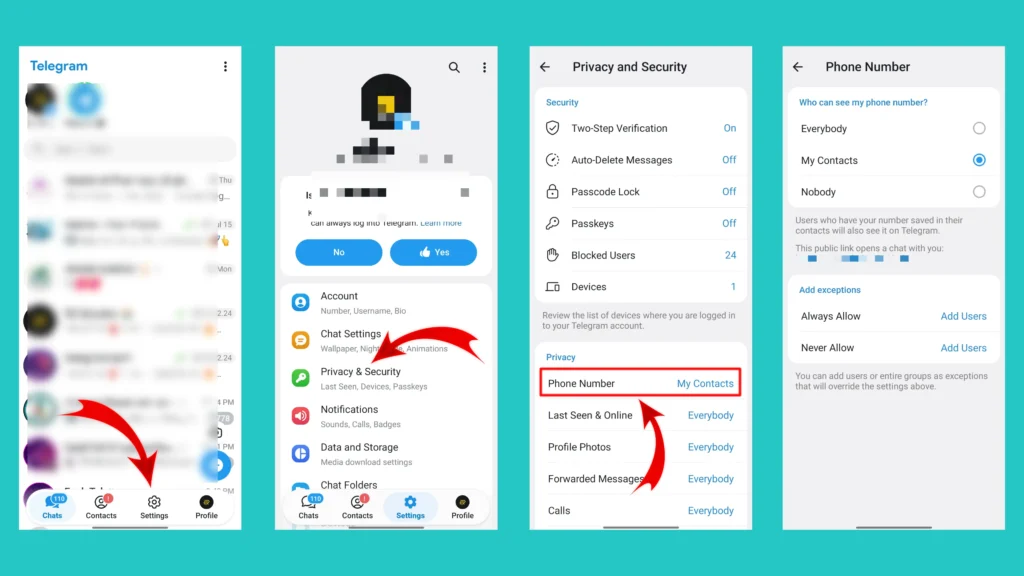
Telegram also provides exceptions that can override your general privacy setting, so review these carefully before leaving the page. If your priority is maximum privacy, carefully review this setting and choose the option that best fits your needs.
Related Article: How to Delete a Telegram Account Permanently
Hide Your Phone Number From Specific Contacts on Telegram
You might be comfortable sharing your number with family members but do not want certain people to see it. Don’t worry, you can do this too.
Telegram’s phone number privacy settings support exceptions, including options such as “Always Allow” and “Never Allow”. You can add individual users or entire groups as exceptions to your privacy setting.
Please follow the below steps to use this feature.
- Open the Telegram app on your phone.
- Go to Settings. Setting option is available on the navigation bar available at the bottom of the home screen.
- Tap on the Privacy & Security option.
- Open the Phone Number section by tapping on it.
- Here you will find the “Add Exceptions” section.
- Choose “Never Allow” opinion and your contact list will open. Add the people you don’t want to share your phone number with.
- Then click on the “Check Icon (✓)” and you will be redirected to the earlier screen.
- Now again tap on the “Check Icon (✓)” available at the top right corner of the screen to save your settings.
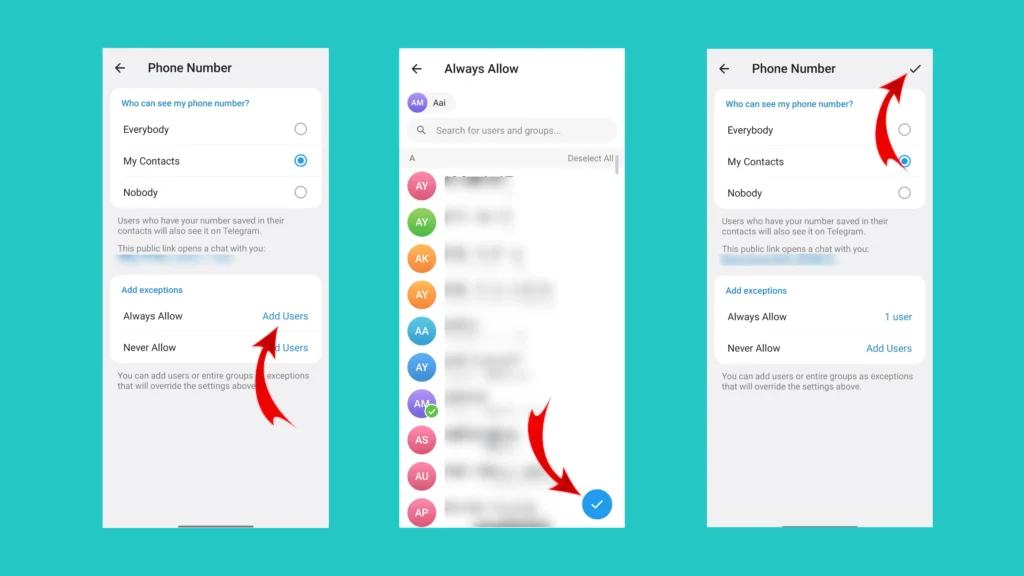
You can also use the “Always Allow” option if you want specific people to be able to see your number despite your general privacy setting.
🎯Tested by Medzix: We verified these steps using the latest available version of WhatsApp at the time of writing.
Can Someone Find You on Telegram Using Your Phone Number?
Can anyone find you on Telegram by just typing your number? Well, It depends on your privacy settings and how the person interacts with your account.
Telegram says people can contact you if they know your phone number. People who don’t know your number may also find you if you share a public username or if you are both members of the same group.
This means hiding your phone number is not the only factor that determines whether someone can find you. Someone may discover you through,
- A mutual Telegram group.
- Your public username.
- A username link you shared.
- Your phone number, depending on your privacy settings.
So, if your goal is to be as private as possible, you should review all of these ways people can discover or contact you.
Can People See Your Phone Number in a Telegram Group?
Joining the same Telegram group doesn’t automatically mean that everyone in the group can see your phone number. Telegram allows users to communicate in private chats and groups without necessarily exposing their phone number. The visibility of your number is controlled by your privacy settings.
However, remember an important exception. If someone already knows your phone number and has it saved in their contacts, they may still see your number. So, joining a group isn’t the same as publicly displaying your phone number but your existing contacts and privacy settings still matter.
Can You Use Telegram Without Sharing Your Phone Number?
Absolutely yes, you can connect and chat with people on Telegram without directly giving them your phone number. One of the easiest ways to do this is to use a Telegram username feature.
Once you create a public username, other people can search for you by that username and message you without knowing your phone number. Telegram also provides username links that can open a chat with you.
💡Fact: You still need a phone number to register a Telegram account.
A username doesn’t replace your account’s registered phone number. Instead, it gives you another way for people to find and contact you without requiring you to share your number directly. Telegram’s privacy policy also states that users provide a mobile number to create an account, while usernames and profile information can be public.
Use a Telegram Username Instead of Sharing Phone Number
If you frequently connect and communicate with people you don’t know personally, a username can be a convenient alternative to sharing your phone number. If you don’t have the Telegram username, you can create a new one in just 5 minutes.
To create one, please follow the below steps.
- Open the Telegram app on your phone.
- Tap on your profile photo available at the bottom navigation bar.
- Click on the Username option.
- Types and choose a username that’s available.
- Save it.
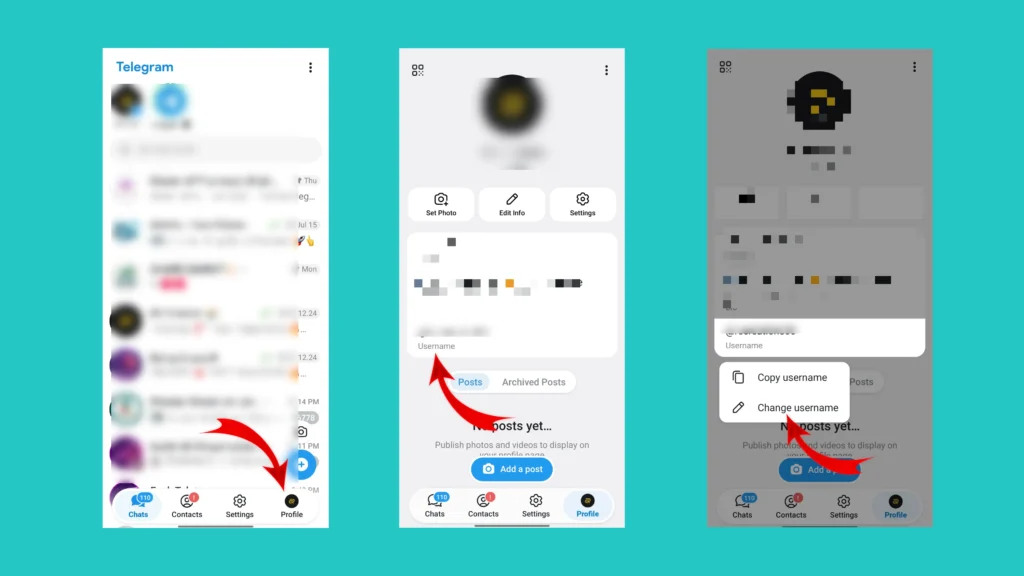
Now you have a Telegram username. You can now share your username or a Telegram username link with others.
For example:
@YourUsername
Or a Telegram username link in the format:
t.me/YourUsername
People can use your username to find and message you without knowing your phone number. Telegram says that when someone finds you by username and you reply, neither party sees the other’s phone number unless the relevant privacy settings allow it.
Conclusion
If you use Telegram to communicate with people outside your personal circle, hiding your phone number can be a useful privacy measure.
If you want to communicate with people without directly giving them your number, consider using a Telegram username. It gives others a convenient way to find and message you while keeping your phone number hidden according to your privacy settings.
If this guide helped you to hide your phone number on Telegram, feel free to share it with friends or leave a comment below with your questions or tips.
Frequently Asked Questions (FAQs)
1. How do I hide my phone number on Telegram?
Go to Telegram → Settings → Privacy and Security → Phone Number. Under Who can see my phone number, choose Nobody if you want to restrict your number’s visibility.
2. Can I hide my Telegram number from everyone?
You can restrict your phone number’s visibility using the Nobody option. However, Telegram notes that people who already know your number and have it saved in their contacts may still see it.
3. Does hiding my phone number hide my username?
No. Your username is a separate setting. If you have a public username, people can use it to find you on Telegram.
4. If someone finds me by username, can they see my phone number?
Not necessarily. Telegram says that when someone finds you by username and you reply, neither party sees the other’s phone number unless the relevant privacy settings allow it.
5. How do I stop people from finding me through my phone number?
Open Settings → Privacy and Security → Phone Number and review Who can find me by my number?. Choose the available option that best matches your privacy needs.