

Delete an Instagram Comment on Android and iPhone
How to Delete or Edit a Comment on Instagram – Sometimes what you don’t want to do on social media happens, such as a comment you unknowingly or accidentally made on an Instagram post, posting the wrong photo, a misspelling while making a comment, accidentally tagging someone else, or an Awkward comment made by someone else on your post.
Especially the comments you made on Instagram or the nasty comments made by others on your Instagram post. Sometimes it makes you feel uncomfortable. But don’t worry, you can quickly delete a comment on Instagram. Let’s see how to do it.
Types of comments on Instagram
There are two types of comments on Instagram.
1. The comment you made on someone else’s Instagram Post.
2. Your own comment that you made on someone else’s Instagram Post.
You can delete both of these types of comments, but you cannot delete comments made by others on other people’s posts. So let’s see how you can delete a comment.
How can I delete a comment I made?
It is very easy to delete a comment on Instagram. Just follow the below steps to do so.
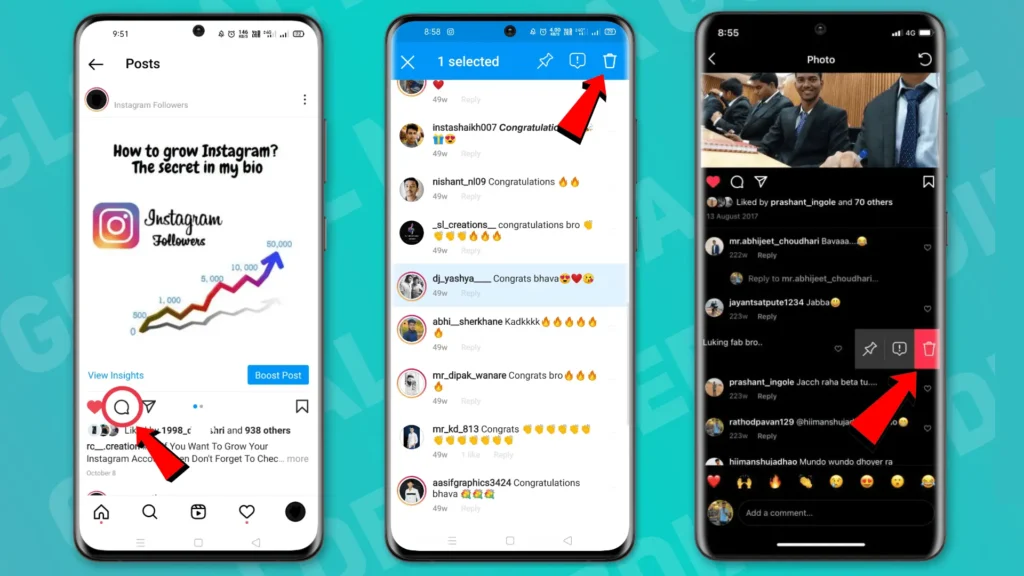
- First, open the Instagram App.
- Now, find the Instagram post and open its comment by clicking on the speech bubble (💬) icon.
- If you have an iPhone, swipe left on the comment you want to delete, and if you have Android, tap and hold the comment.
- Click on the trash can icon to delete your comment. Android users will find this icon in the top right corner.
How to delete a comment on Instagram on your computer?
- Open your browser and go to instagram.com. (Prefer to use Chrome)
- Log in to your account and locate the comment which you want to delete.
- Now, move your cursor to that comment. (You will see three dots on the right side of the comment)
- Click on those three dots and select the delete option.
Related Article: How to Post Multiple Photos on Instagram (2026 Guide)
How to Delete Comments in Bulk on Instagram using iPhone and Android
Sometimes your Instagram post is full of spam comments, and no one wants to keep it that way. But deleting one comment at a time is not a good option. You can delete a large number of comments in one click. Let’s see how to do this on iPhone and Android.
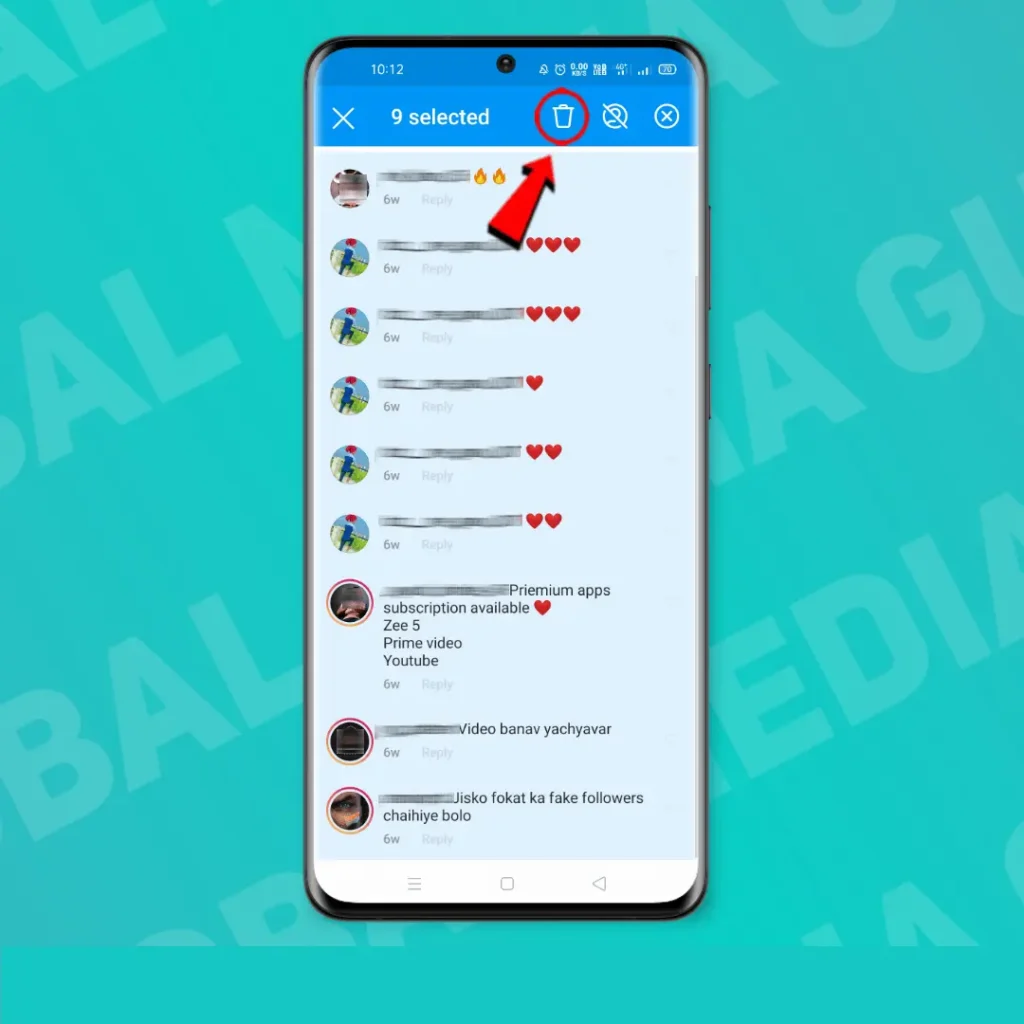
- Open the comments of your Instagram post by clicking on the speech bubble icon.

- iPhone user, click on the three dots available in the top right corner and select the Manage Comment option.
- For android users, Tap and hold on to the comments that you want to delete.
- Select up to 25 comments.
- Tap on the trash can icon to delete all selected comments.
Can I delete my comment on someone else’s post?
Deleting your comments on someone else’s Instagram post is as easy as deleting a comment on your own Instagram post. Here’s how you can do so.
- First, find the Instagram post you commented on.
- iPhone users can swipe left over the comment, and android users can tap and hold the comments which they want to delete.
- Now, Tap on the trash can icon to erase or delete your comments.
Can I edit a comment on Instagram?
No, you can’t edit your comments on your Instagram posts or on other people’s Instagram posts. Currently, you can only edit the caption of your Instagram post after posting it. If you want to do that, let’s see how the captions of Instagram posts are edited.
- Open the Instagram app.
- Find the Instagram post whose caption you want to change or edit.
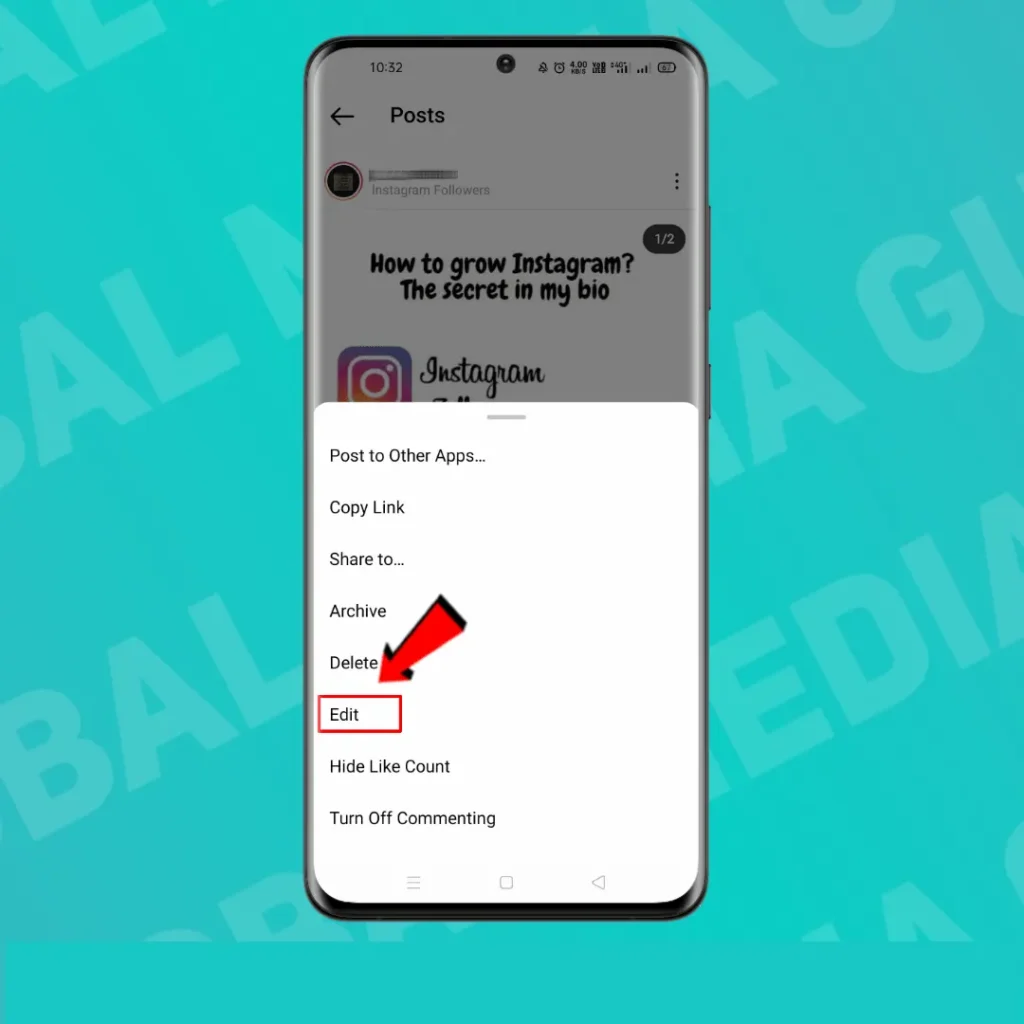
- Touch the three horizontal dots in the top right corner of the Instagram post.

- Choose the edit option.
- Re-write your caption.
- Press save/done.
There is no limit to editing the caption of your Instagram post. You can even edit the caption of your oldest Instagram post.
Hopefully, this article has answered all your questions about deleting the comments on Instagram and editing comments on Instagram. If you have any suggestions or a magical workaround for this, please let us know in the comments below.
Frequently Asked Questions
Can I edit a comment on Instagram after posting it?
No. Instagram currently does not allow users to edit comments after they have been posted. If you’ve made a mistake, you’ll need to delete the comment and post it again with the correct text.
How do I delete my comment on someone else’s Instagram post?
Open the Instagram post where you left the comment. On Android, tap and hold your comment. On iPhone, swipe left on the comment. Then tap the trash icon to permanently delete it.
Can I delete someone else’s comment on my Instagram post?
Yes. If someone has commented on your Instagram post, you can remove their comment. Simply open your post, locate the comment, then tap and hold it (Android) or swipe left (iPhone), and tap the trash icon.
Can I delete comments made by other people on someone else’s Instagram post?
No. You can only delete comments that you wrote or comments that others have written on your own posts. Instagram doesn’t allow you to remove comments made by other users on someone else’s posts.
Can I recover a deleted Instagram comment?
No. Once a comment is deleted, it cannot be recovered. Make sure you really want to remove it before tapping the delete button.
Why can’t I delete my Instagram comment?
If you’re unable to delete a comment, try these solutions:
1. Update the Instagram app.
2. Check your internet connection.
3. Log out and log back into your account.
4. Restart your phone.
5. Try deleting the comment from another device or the Instagram website.
[…] Related Article: How to Delete or Edit a Comment on Instagram […]
[…] Related Article: How to Delete or Edit a Comment on Instagram […]
[…] Related Article: How to Delete or Edit a Comment on Instagram […]
[…] Related Article: How to Delete or Edit a Comment on Instagram […]
[…] Related Article: How to Delete or Edit a Comment on Instagram […]