


Instagram Stories are one of the most popular features of Instagram, allowing users to share photos, videos, music, polls and much more. If you want to grab someone’s attention, give credit to a creator or share content with friends, tagging them in your story is the easiest way to do it.
In this guide, we will show you how to tag someone on Instagram Story, how to hide mentions, how to tag people after posting and what to do if tagging isn’t working.
💡Quick Answer: To tag someone in an Instagram Story:
- Open Instagram.
- Create a new story.
- Tap the sticker icon.
- Select the @Mention sticker.
- Enter the username.
- Publish the story.
How To Tag Someone On Instagram Story
Instagram has a great feature called “Story” which allows you to share your daily activities with your followers without sharing it as a post. Instagram stories only last 24 hours and disappear after that.
You can tag or mention your friends, artist, brands, etc. on your Instagram story. Instagram launched a tagging feature in October 2010 and it is super easy to tag/mention someone on your story.
Steps to tag someone on Instagram Stories
Method 1 – Use the Mention Sticker
- Open Instagram app on your mobile phone.
- Click on the your story option available at the upper left corner of your screen or you can swipe left while viewing your Instagram feed.
- Select the image or video which you want to share on your story.
- Tap on the sticker option.
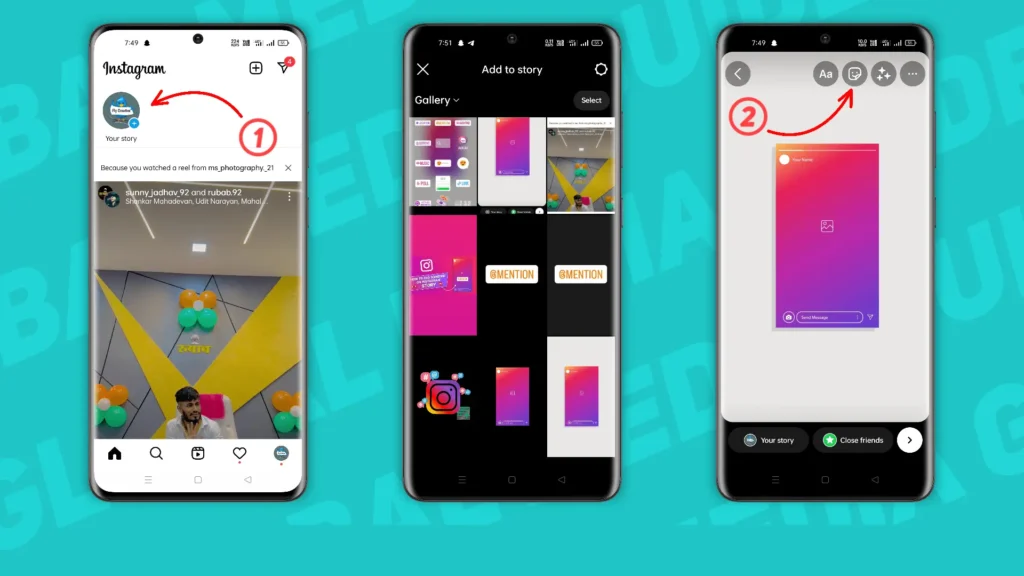
- Select @MENTION sticker.
- Type the username or name of that person, artist or company.
- Tap on the user whom you want to tag in your story from the shown option.
- Then tap on “Your Story” or “>” icon and your story will get published.

Related Article: How to Post Multiple Photos on Instagram (2026 Guide)
Method 2: Use the @ Symbol
Method 2 is comparatively easier than method 1 to tag someone on your Instagram story. Let’s see what is it.
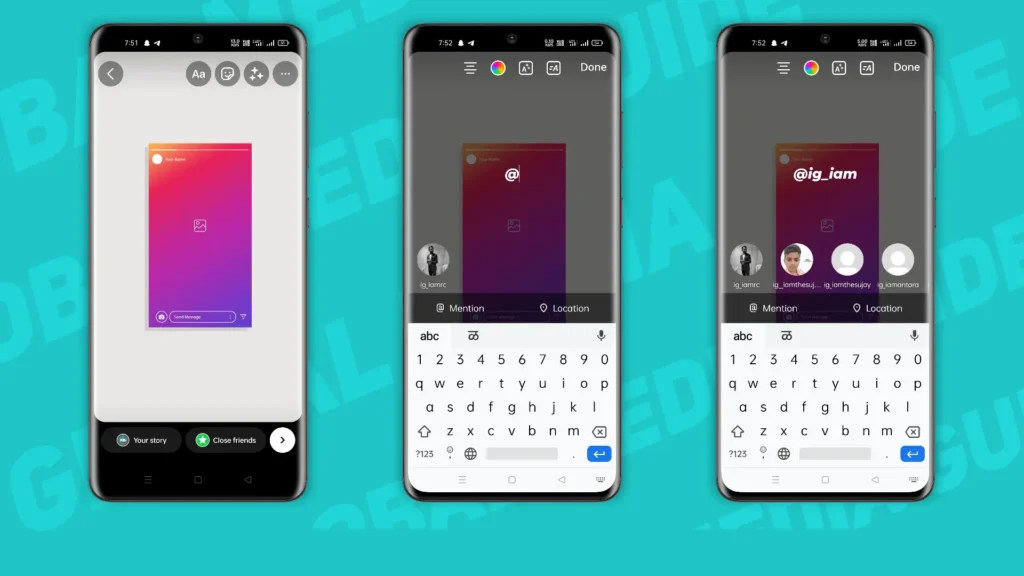
- Choose the images or videos from your phone which you want to share on your story.
- Tap on the “Aa” option available at the top right corner of your screen.
- Type “@” and start entering the name or username of that person. (Don’t give any space after writing “@”).
- Instagram will show you some user with the similar name and username.
- Tap and select the user to mention it in your story.
- Publish your story.
That’s all there is to it! Tagging someone on an Instagram Story is a great way to get their attention or give them credit for something you’re featuring in your story.
How To Tag Someone On Instagram Story Without It Showing
Yes!! You can tag someone in your Instagram story without showing it on your story. Sometimes you don’t want any “mention” sticker on your photo or video that you are going to post on your story. You can hide it. Here’s how you can do it.
- Mention someone in your story.
- Decrease the size of mentioned sticker or name as small as possible.
- Tap and drag the sticker or name out of the screen.
Remember!! The person you have mentioned in your story gets the mentioned notification and they are able to view and repost it on their story. The story will disappear after 24 hours for the mentioned user.
How To Tag Someone On Instagram Story After Posting
Sometimes you forget to mention the person in your story and publish it without mentioning them. Is it possible to tag someone in your story on Instagram after posting?
The simple answer to this question is YES, you can mention anyone after posting the story. As per the latest version of the Instagram app, you can by following below simple steps.
- Open your published Instagram story.
- Click on the “@ Mention” option available at the bottom menu.
- Choose the person, creator or anyone you want to mention in your story.
- Tap on the “Add” button.
That’s all! You can simply mention the user in your story whom you forgot to tag when you originally published it.
Alternatively, Instagram stories are short term and you can post multiple stories without any limit. You can simply delete the story and post another story with mentioning the user that you want to mention.
Conclusion
Tagging someone on Instagram story is that easy. You can use this feature to inform your followers about the person or brand being featured in your story. This can help you to increase the engagement rate.
If you still have any question regarding “how to tag someone on Instagram story”, you can ask us in the comment section below.
Frequently Asked Questions (FAQs)
1. Why Can’t I mention someone on Instagram story?
If you are unable to mention someone on your Instagram story then there is a possibility that the user you are trying to mention has changed their “who can mention them” setting.
2. How can I control my mentions?
Instagram provides you the option to manage who can mention you in an Instagram story. You can access this setting via the “Privacy Setting” option in Instagram App.
3. Will someone be notified when I tag them in my story?
Yes. Whenever you tag someone in an Instagram Story, Instagram sends them a notification. Depending on their privacy settings, they may also be able to share your story with their followers.
4. How many people can I tag in a single Instagram Story?
Instagram allows users to mention up to 20 accounts in a single story.
5. Can I hide a mention on my Instagram Story?
Yes. After adding a mention sticker, you can reduce its size and move it to the edge of the screen so that it becomes less noticeable.
6. Can I tag a private Instagram account?
Yes, you can mention a private account. However, only users who are allowed to view that account’s content will be able to see the tagged profile.
7. What’s the difference between tagging and mentioning someone on Instagram?
In Instagram Stories, the terms tagging and mentioning are generally used interchangeably. Both methods notify the person and create a link to their profile.