

How to Delete a Snapchat Account
Snapchat can be a fun way to stay connected with friends, share moments and keep up with the latest trends. However, there may come a time when you decide that it is time to leave the platform.
Some people delete Snapchat because they want more privacy, while others simply want to take a break from social media. You might also want to remove your account because of too many notifications, concerns about screen time or because you plan to create a new account.
Whatever your reason may be, Snapchat allows users to deactivate and permanently delete their accounts.
In this article, we will see how to delete Snapchat account permanently on Android, iPhone and the web. We will also try to explain what happens after deletion, whether you can recover your account and how long Snapchat keeps your information.
💡Quick Answer: To delete your Snapchat account, follow these steps:
Open Snapchat → Go to your profile page → Settings → Select delete account deletion → Enter your account password → Confirm the deletion request.
Snapchat first deactivates your account for a certain period. If you don’t log in again during that time, your account is permanently deleted.
Can You Permanently Delete a Snapchat Account?
Yes, you can permanently delete your Snapchat account. Snapchat allows users to permanently delete their accounts. However, the process doesn’t happen immediately. When you submit a deletion request, Snapchat first deactivates the account. During this period, your friends won’t be able to contact you through Snapchat.
If you decide to return, you can simply log back into your account before the deletion period ends. If you don’t sign in again, it will permanently delete Snapchat account. Snapchat has designed this process to prevent accidental account deletion.
How to Delete a Snapchat Account on Android
Let’s see the detailed steps to delete your Snapchat account. These steps are verified by Medzix using the latest available version of the Snapchat app at the time of writing.
Step 1: Open the Snapchat application on your smartphone.
Step 2: Tap your profile icon in the upper left corner of the screen.
Step 3: Tap the gear icon (⚙️) in the upper right corner.
Step 4: Scroll down and find the “Delete Account” option under the section my account.
Step 5: Select the “Delete Account” option. Snapchat will ask you to verify your identity by entering your password.
Step 6: Enter your Snapchat account password and click “Continue”.
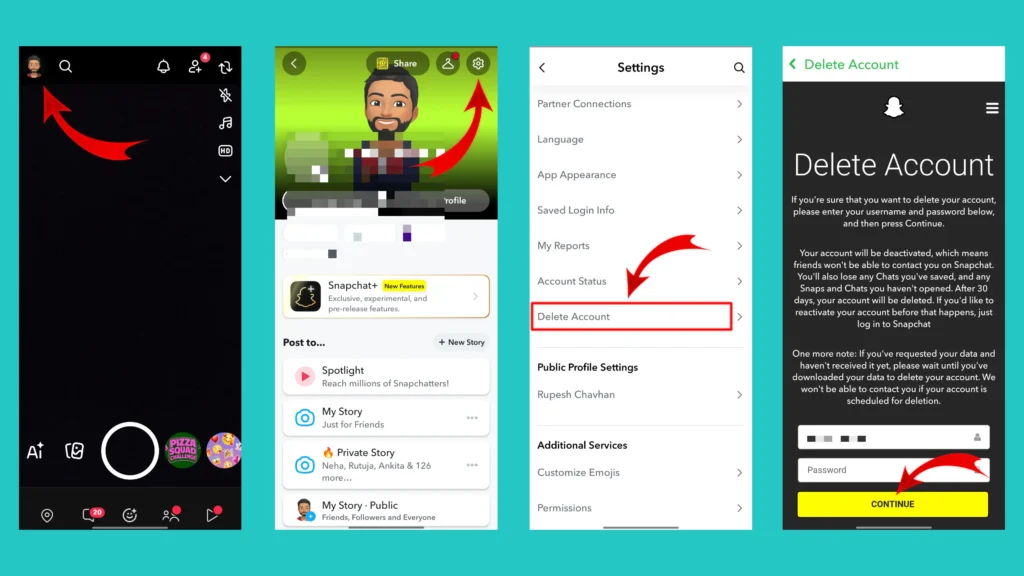
Done! Your Snapchat account will be deactivated immediately. If you don’t login your account within 30 days, your Snapchat account will be deleted permanently.
Related Article: Snapchat Streak Lost? Get It Back with This Steps
How to Delete Your Snapchat Account Using iPhone
The process for iPhone users is very similar to the Android one. Follow the below steps to delete your Snapchat account.
- Open Snapchat and tap your profile icon.
- Open the Settings menu.
- Locate the account deletion option.
- Verify your account details.
- Confirm the deletion request.
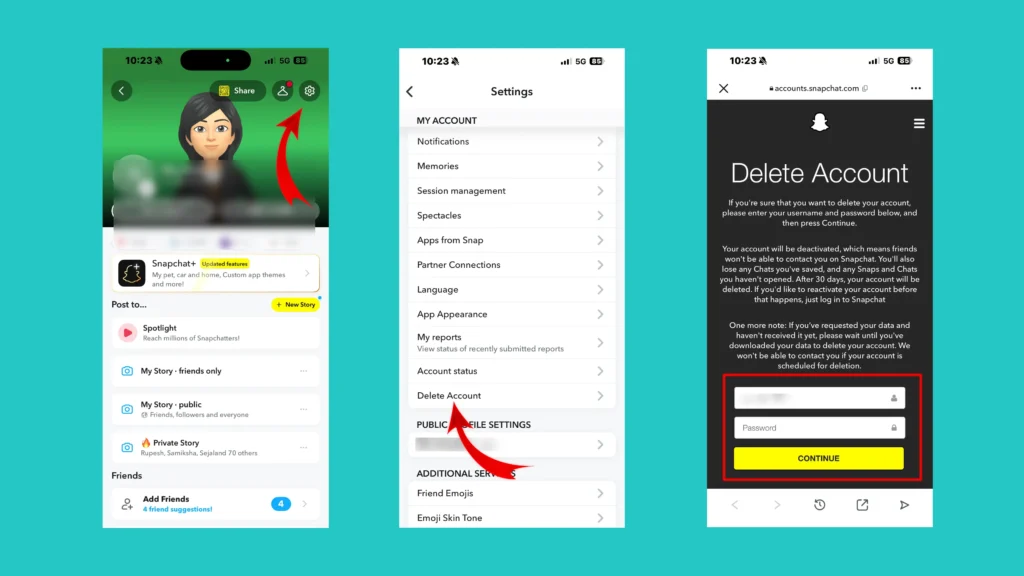
After completing these steps, your account will be scheduled for deletion. The step by step images of the process are provided below for your reference.
How to Delete a Snapchat Account Using a Web Browser
You can also delete Snapchat account by using your web browser. Many users find this method easier because it can be completed directly from a computer. The detailed steps are mentioned below.
Step 1: Click on the Following link to reach the Snapchat login page. URL: https://accounts.snapchat.com/v2/login
Step 2: Enter your Username or Email and click on next. Enter your password and sign in to your account.
Step 3: Click on your profile icon available at the bottom left corner. A menu will pop up.
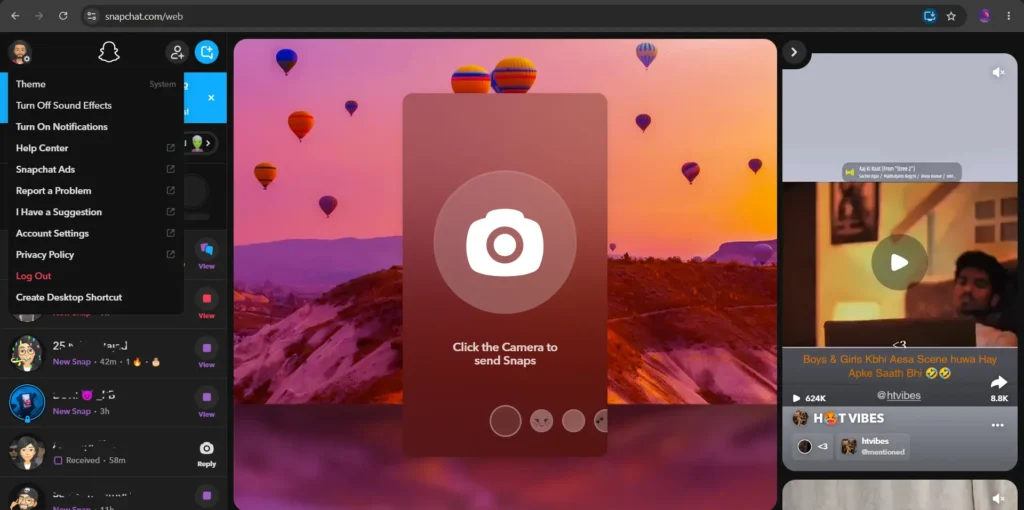
Step 4: Select “Account Settings” option from the menu. A new tab will open up.
Step 5: Scroll down and Choose the “Delete my account” option.
Step 6: Enter your username and password and click on continue.
Step 7: Confirm the deletion request.
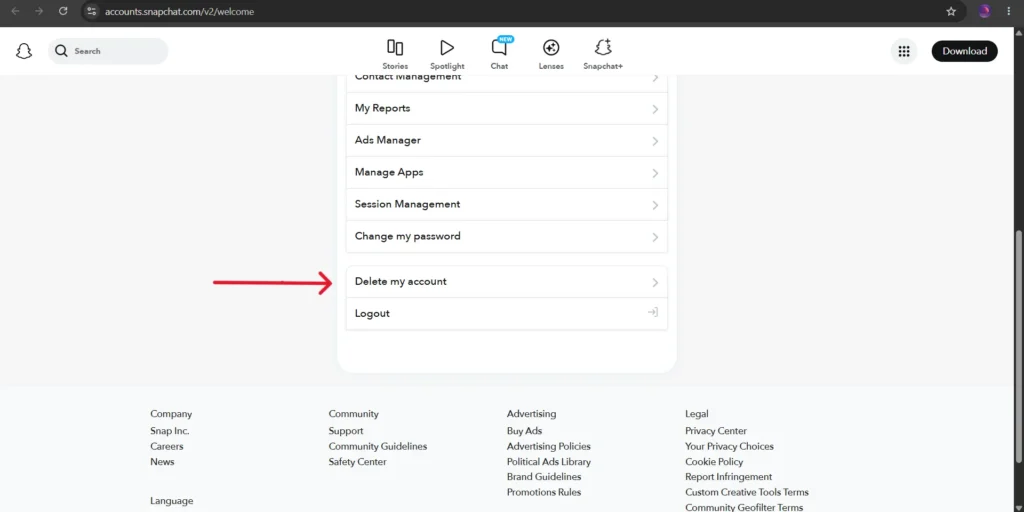
That’s it! This is how you can delete your Snapchat account on a web browser. This method is especially useful if you no longer have access to the Snapchat app.
How to Temporarily Deactivate a Snapchat Account
You can temporarily deactivate your Snapchat account but Snapchat doesent provide any separate deactivation button.
Technically, Snapchat uses a deactivation process before permanently deleting an account. During this period:
- Your profile won’t be visible.
- Your friends won’t be able to contact you.
- You can reactivate the account by signing in again.
- Your account information remains available until the deletion process is complete.
This provides users with time to reconsider their decision. You can restore everything simply by logging back within 30 days.
What Happens When You Delete Your Snapchat Account?
Many users wonder what happens after they submit a deletion request. Here’s what you should know.
Your profile becomes unavailable and your friends will no longer be able to find your account. Some conversations and saved messages might no longer be available.
Your memories could be lost. If you have important photos or videos saved in Memories, it’s a good idea to back them up before deleting your account.
Any Snapchat-related subscriptions linked to your account may be affected. Active streaks may also be lost if the account is permanently deleted.
Can You Recover a Deleted Snapchat Account?
The answer depends on whether the account has already been permanently removed. If the account is still deactivated, You may be able to recover it simply by signing in again. If the account has already been deleted, recovery may no longer be possible.
This is why backing up important information before deleting the account is strongly recommended.
Conclusion
Deleting a Snapchat account is a major decision, especially if you have years of memories, conversations and streaks connected to the app. Before proceeding, make sure you back up everything important. Once the deletion period ends, recovering the account may become difficult or impossible.
If you are only looking for a short break, temporarily deactivating the account or uninstalling the app might be a better choice. On the other hand, if you have made up your mind, the steps mentioned above will help you permanently delete Snapchat account.
Frequently Asked Questions (FAQs)
Snapchat account delete kaise kare?
Open Snapchat, access the account management section, verify your identity, and confirm the deletion request.
Can I temporarily deactivate my Snapchat account?
Yes. Snapchat first deactivates the account before permanently deleting it.
Can I reactivate my Snapchat account?
Yes, as long as the account hasn’t been permanently removed.
Will I lose my Snapchat streaks?
You may lose your streaks if your account is permanently deleted.
Can my friends see that I deleted Snapchat?
Snapchat doesn’t notify other users, but they may notice that your account is no longer active.
Can I create another Snapchat account later?
Yes. You can create another account in the future if you wish.
Is deleting Snapchat the same as uninstalling the application?
No. Uninstalling the application removes it from your device, while deleting the account removes access to the account itself.
Can I delete Snapchat from a computer?
Yes. You can access Snapchat’s account management portal through a web browser.