

How to get your lost streak back
Lost your Snapchat Streak? Don’t worry, it may still be possible to recover it. Snapchat now offers ways to restore eligible streaks and if that doesn’t work, you can contact Snapchat Support. This guide explains why streaks disappear and the steps you can take to get yours back.
One of the most popular features of Snapchat is the Snapchat streak (officially known as Snapstreaks). Snapchat users can create this snap streak by sending photos and videos to their friends, and most of you will definitely create a streak with your friends at some point. But sometimes for some reason the streak disappears and if you lost your Snapchat streak, don’t panic! In this article you will find a way to get back your Snapchat streak.
Although Snapchat will notify you when your streak is about to end (when there are no snaps sent within 24 hours). The loss of Snap streaks is one of the most horrible situations that can occur to anyone! It’s frustrating, but fret not as there’s an opportunity to get your Snapchat streak back from where you left.
Why Have I Lost My Snapchat Streak?
There are three possible reasons behind disappearing your snapstreak. All three are mentioned below
1. You have forgotten about sending Snaps
This is the most common reason behind disappearing your snapstreak. Because you need to send at least one snap within 24 hours to maintain a streak with your friend. It is completely a human error and can happen with anyone.
2. Bug in Snapchat Platform
Sometimes you send a snap to your friend within 24 hours, but due to a technical issue with the Snapchat app, that snap is not considered valid and you lose the streak with your friend.
3. Your Mobile Device Problem
The Operating Systems of many mobile phones might not function properly when you open the app. Occasionally, your mobile network also be the reason for not sending Snap and it is considered as a technical issue.
If they want to maintain an active fan base, Snapchat has a number of issues that they need to address quickly.
Related Article: How To Make a Public Profile on Snapchat
How to get your lost streak back on snapchat 2026
You can easily recover your lost snapchat streak but there is no magic trick to recover it. Instad there are two methods to restore your snapstreaks and they are:
- Restore inside Snapchat.
- Contact Snapchat Support
How to Restore a Lost Snapchat Streak Inside the App
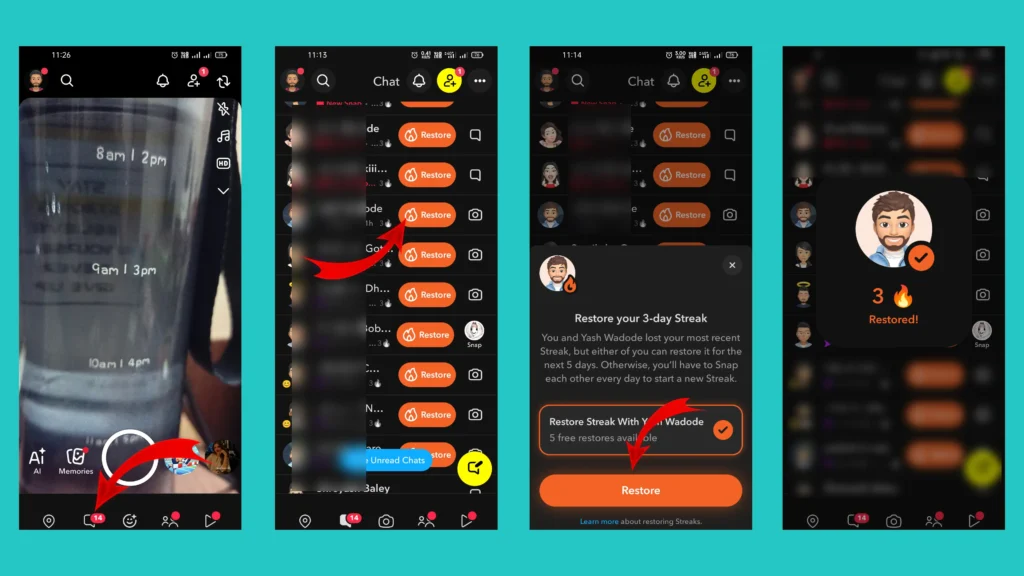
Snapchat now allows many users to restore a lost Snapstreak directly from the app without contacting Snapchat Support. If your account is eligible, you will see the Restore option next to your friend’s name after a streak expires. Follow these steps to restore your Snapstreak:
- Open the Snapchat app and sign in to your account.
- Go to the chat screen and find the friend whose Snapstreak has disappeared.
- If your account is eligible, you will see a restore button (or a 🔥 icon with a restore option) next to your friend’s name.
- Tap Restore. If you don’t have the Snapchat+ then you can restore streak for 5 times only.
- Once the process is complete, your Snapstreak will be restored, and the 🔥 fire emoji with your streak count should reappear.
How to Contact Snapchat Support to Recover Your Snapstreak
You need to inform the Snapchat support about lost snapstreak and you can do this within 5 minutes. Just follow the below simple steps to start the recovery process.
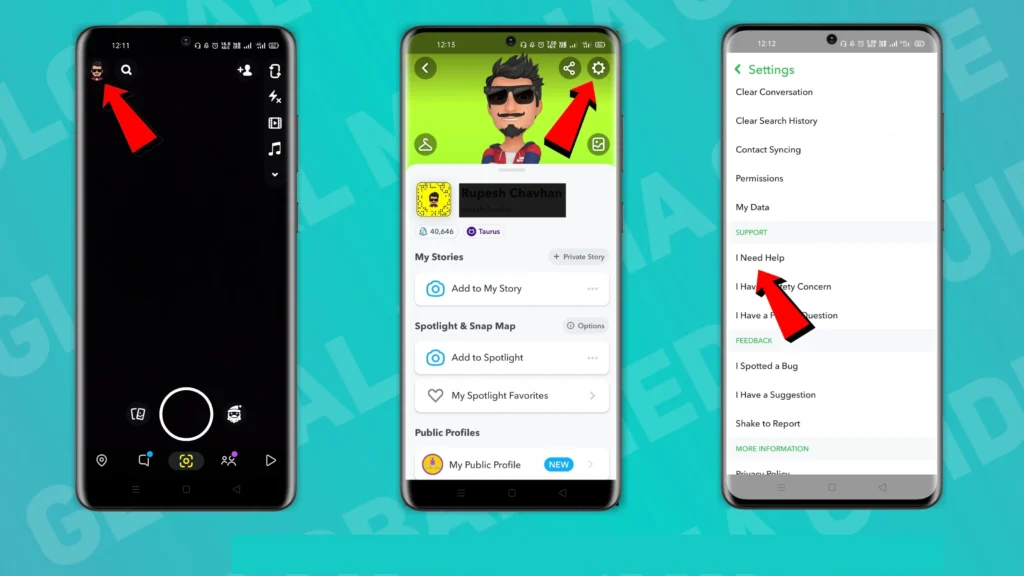
- Start by launching the snapchat app (Sign in to your account if you haven’t).
- Tap on “Your Profile” or “Bitmoji” icon available at upper top left corner.
- Enter into settings by taping the gear icon (⚙️) in the top upper right corner.
- Head toward the “Support” section and tap on the “I Need Help” option.
- In popular topics, tap on “Snapstreak” option.
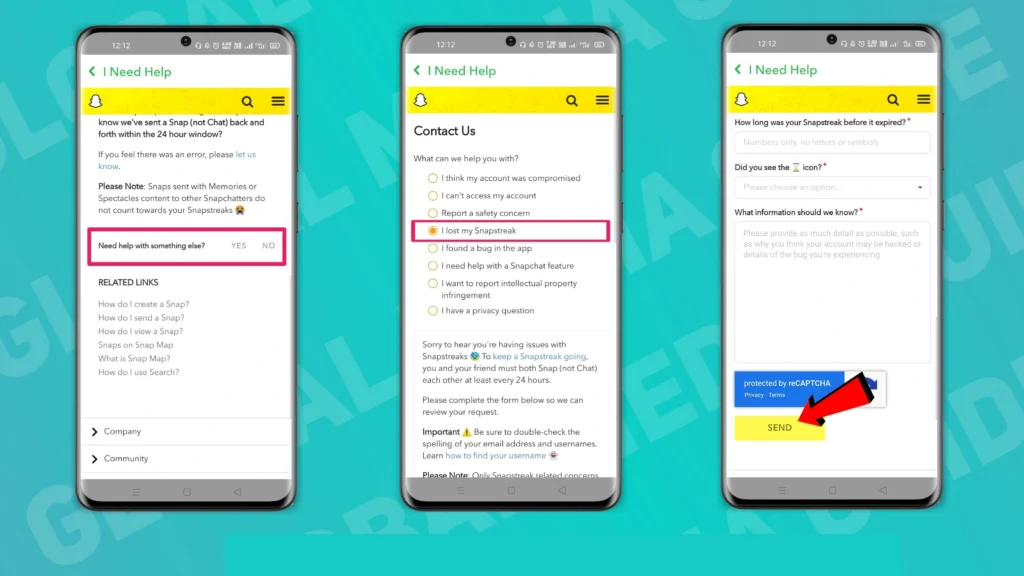
- Scroll down and look for “Need help with something else?” and tap “Yes”.
- Now choose “I lost my Snapstreak” under “What can we help you with?” section.
After this a contact form will appear at the bottom of the page. As per the current version of the app, you have to fill the below details In this form.
- Username
- Mobile Number
- Device
- Friend’s Username
- When did you start having this issue?
- How long was your snapstreak before it expired?
- Did you see the ⏳ icon? (Select “No” to get the streak back)
- What information should we know?
In the “What information should we know?” field, you have to describe the reasons for the loss of the streak. Clearly explain what happened. If you believe you lost your streak because of a technical issue or app problem, describe it honestly and include any relevant details.
- Complete the captcha and tap on the “send” button.
You have just sent the application to Snapchat. Now Snapchat will review your request and if you’re eligible to get your Snap streak back you will get informed by mail.
Rules to Maintain Snapchat streak
The Streak starts when you and your friend send Snaps with each other for over three days. After the beginning of the snap streak, a fire icon appears next to that contact’s name. The number of days you’ve snapped with your friend is shown by the number beside the fire icon.
To maintain the streak you need to send at least one Photo/Video snap within 24 hours. If you are thinking that chatting or sending stickers will help you to keep your streak alive then you are wrong. Because chatting and sending stickers will not be considered a snap.
Some other things are mentioned below which are not considered as a Snap for Snapstreak –
- Picture/Videos picked from the camera roll or memories
- Content send through Spectacles
- Snap sent to Groups
I hope that this article helped you to get your snapchat lost streak back. If you found this article helpful then please share it with your friend and let them know about “How to get your lost streak back on Snapchat in 2026”.
If you have any questions, feel free to share it with us in the comment section below!
Frequently Asked Questions (FAQs)
How many times will Snapchat restore a streak?
Snapchat has not officially announced how many times they can restore your streak, but in most user experience we can say that Snapchat can restore your streak at most twice.
What is the Snapchat support calling number?
Sorry, but Snapchat doesn’t have any calling number which you can call. The only way to contact them is their “Contact Us” webpage.
How long do I have to restore a lost Snapchat Streak?
Snapchat doesn’t officially specify a fixed time limit. It’s best to restore your streak or contact Snapchat Support as soon as you notice it has disappeared to improve your chances of recovery.
Can Snapchat Support restore every lost Streak?
No. Snapchat reviews each request individually. While many eligible streaks are restored, recovery isn’t guaranteed in every case.
Do chats or stickers count toward a Snapstreak?
No. Text messages, stickers, voice notes, video calls, and group chats do not count toward maintaining a Snapstreak. Only photo or video Snaps exchanged directly between you and your friend keep the streak active.
Does sending a Snap to a group count for a Snapstreak?
No. Snaps sent to a group conversation don’t count toward a Snapstreak. You must send a photo or video Snap directly to your friend.
[…] Related Article: What is Snap Streak? How to Get It Back […]
[…] Related Article: Snapchat Streak Lost? Get It Back with This Steps […]
[…] Related Article: Snapchat Streak Lost? Get It Back with This Steps […]